Lead Qualification Checklist for Small Businesses
Stop wasting time on unqualified prospects: use a 4–7 question checklist, define your ICP, apply BANT or CHAMP, and leverage AI scoring to prioritize real buyers.
Lead Qualification Checklist for Small Businesses
Small businesses waste time chasing unqualified leads - 67% of lost sales happen due to poor qualification. To fix this, you need a structured process to identify high-potential prospects quickly. Here’s what matters most:
- Define Your Ideal Customer Profile (ICP): Focus on firmographics, geographics, technographics, and behavioral traits to target the right companies.
- Core Qualification Criteria: Evaluate leads based on need, decision-making authority, financial readiness, timing, and compatibility with your ICP.
- Use Proven Frameworks: Methods like BANT (Budget, Authority, Need, Timeline) or CHAMP (Challenges, Authority, Money, Prioritization) can simplify lead evaluation.
- Leverage AI Tools: Automate lead scoring, data enrichment, and follow-ups to save time and boost productivity.
Companies with clear qualification systems see up to a 20% conversion rate, compared to just 1–3% without one. Start by creating a checklist with 4–7 key questions and refine it regularly to keep improving results.
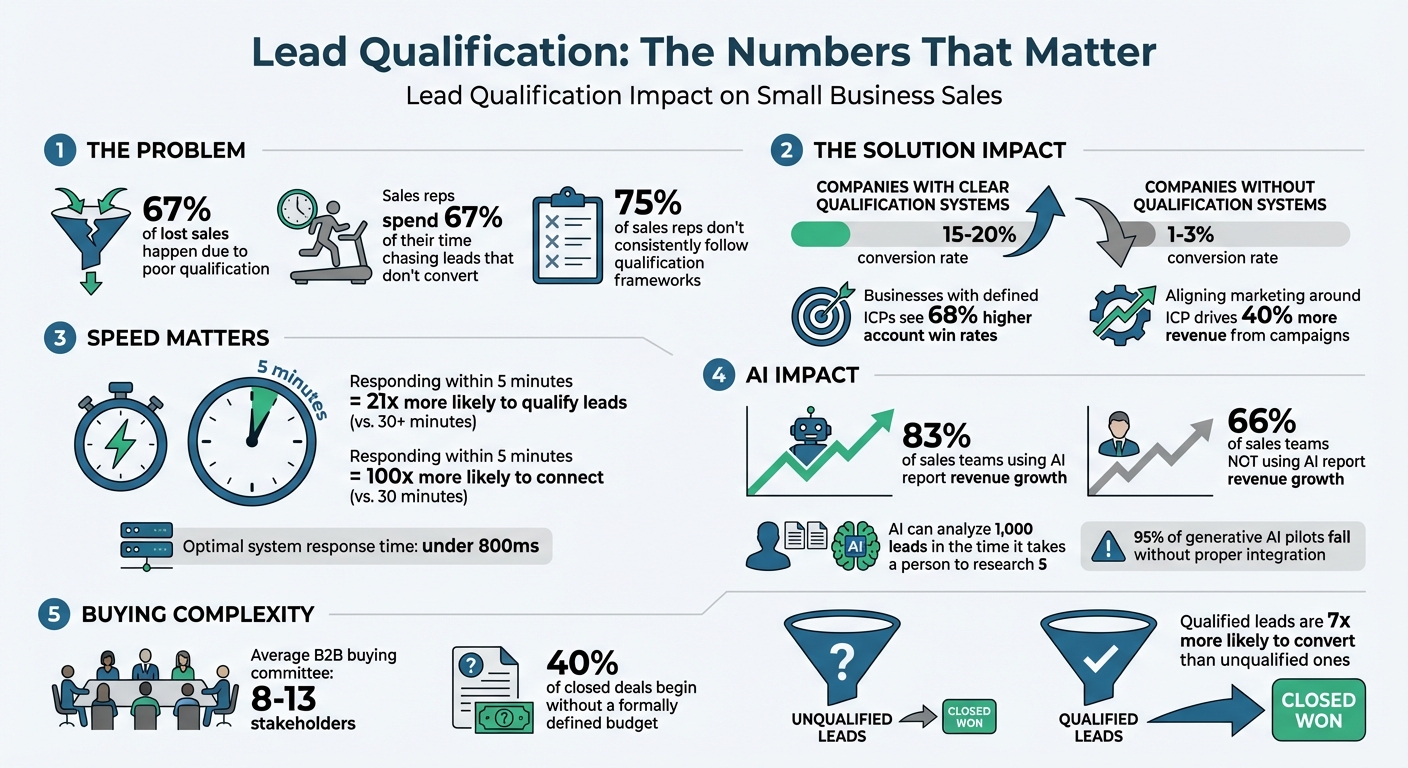
Lead Qualification Statistics and Impact on Sales Conversion Rates
Effective Lead Qualification Strategies | The Secret to Getting More Conversions
sbb-itb-b3fe1da
Defining Your Ideal Customer Profile (ICP)
An Ideal Customer Profile (ICP) outlines the types of companies that benefit most from your product or service. Think of it as a snapshot of businesses most likely to convert and see value from what you offer. Why does this matter? Businesses with clearly defined ICPs see 68% higher account win rates because they focus their energy on leads that are more likely to succeed. By nailing down your ICP, you set the stage for better lead qualification, ensuring your efforts are geared toward high-value opportunities.
It’s important to note the difference between an ICP and a buyer persona. An ICP zeroes in on the organization, while a buyer persona focuses on the individual decision-makers within that organization. For small businesses with limited bandwidth, defining your ICP ensures you’re focusing on the right companies before narrowing your efforts to specific people. In fact, aligning marketing around a well-defined ICP can drive 40% more revenue from campaigns.
Key Elements of an ICP
A strong ICP is built around firmographic, geographic, technographic, and behavioral attributes that define your ideal customers. Let’s break these down:
- Firmographics: These include details like industry, employee count, annual revenue, business model (e.g., B2B, B2C, SaaS), and company age. For instance, you might target "B2B SaaS companies with 50–200 employees and $5M–$20M in annual revenue".
- Geographics: Specify the locations you want to target - countries, states, cities, or even time zones. This helps you optimize outreach and follow-up timing.
- Technographics: Look at the technologies your prospects use, like their CRM system or marketing tools. This can help you gauge compatibility or sophistication.
- Behavioral Attributes: These track customer actions, such as visits to pricing pages, demo requests, email engagement, or content downloads.
- Situational Triggers: Keep an eye on external signals, such as recent funding, leadership changes, or aggressive hiring trends.
Here’s how these attributes stack up:
| Category | Key Attributes to Include |
|---|---|
| Firmographics | Industry, Employee Count, Annual Revenue, Business Model, Company Age |
| Geographics | Target Countries, Regions/States, Specific Cities, Timezones |
| Technographics | Current CRM, Marketing Automation, Required Integrations, Incompatible Tools |
| Behavioral | Website Visits (Pricing/Demo), Email Clicks, Content Downloads, Event Attendance |
| Situational | Recent Funding, New Leadership, Hiring Trends, Headcount Growth |
Equally important are disqualifiers - traits that indicate a company isn’t a good fit. These might include industries you can’t serve, company sizes that tend to churn, or incompatible tech stacks. As Zach Lezberg puts it:
Strategic alignment starts with knowing who to ignore.
How to Gather Data for Your ICP
Once you’ve outlined these attributes, the next step is to analyze data to pinpoint your best customer segments. Start by looking at your top 20% of customers - those with the highest lifetime value (LTV), shortest sales cycles, and lowest churn rates. Export this data from your CRM and identify patterns. Focus on traits that show up in at least 60% of your best customers, as these will form the foundation of your ICP.
To identify your "best" customers, use a simple formula: (Current ARR x Months as Customer) – (Support Tickets Logged). This "Success Score" highlights customers who are both profitable and low-maintenance. Then, conduct qualitative interviews with 5–8 of these top customers to understand their motivations - what triggered them to seek your product?. Additionally, interview 10–20 "Super Users" to dive deeper into the key events that led them to your solution.
Don’t stop there. Review past deals that didn’t close, especially those that made it past the discovery stage. Look for recurring traits that signal poor fit - this helps you spot red flags early on. As the Cleanlist team emphasizes:
A good ICP isn't a document that sits in a folder. It's an operational tool that helps every team prioritize.
Core Lead Qualification Criteria
Once you've nailed down your Ideal Customer Profile (ICP), the next step is figuring out how to assess individual leads effectively. Many businesses lose potential revenue because their qualification process is inefficient. Here's the kicker: companies with strong lead qualification systems see conversion rates of 15–20%, while those without proper systems manage only 1–3%. To help you qualify leads efficiently, here are five key criteria to focus on.
1. Clear Need
Start by identifying whether the lead has a specific, well-defined problem that your product or service can solve. A vague interest won’t cut it - you need to uncover real business challenges. As HubSpot explains:
"If there's no problem, there's no need for your solution. Qualify for business pain first."
Ask open-ended questions like, "What has stopped you from addressing this issue before?" or "Can you walk me through the last time this problem caused you financial or operational trouble?" These questions help determine whether the lead can articulate their pain points clearly.
Next, evaluate their current solutions. Find out what they’re using now and why it’s falling short. Questions like, "What happens if this problem isn’t solved by the end of the quarter?" can help you assess the urgency and consequences of inaction. Leads with high urgency often face declining ROI or operational setbacks. If there’s no clear downside to waiting, they might not be ready to buy.
It’s also important to ask them how they’d measure success. For example: "How will you know if a new solution is working for you?" This ensures your offering aligns with their expectations. Beyond conversations, track online behaviors like repeated visits to your pricing page or multiple demo requests as signs of need.
To gauge urgency, use a scale of 1 to 10. Ask them to rate how important solving their problem is. Leads scoring below a 7 are better suited for nurturing campaigns rather than immediate sales efforts. Remember, qualified leads are seven times more likely to convert than unqualified ones.
| Qualification Step | Questions to Ask | Red Flags to Watch For |
|---|---|---|
| Pain Point Discovery | "What challenge is this product helping you solve?" | Vague answers or inability to describe the problem. |
| Current State Analysis | "How are you addressing this issue currently?" | Satisfaction with a "good enough" solution. |
| Impact Assessment | "What happens if this isn’t resolved soon?" | No clear negative consequences of inaction. |
| Success Definition | "How will you measure success with a new solution?" | Unrealistic expectations or no clear success metrics. |
Once you’ve identified a clear need, the next step is checking if the lead has the authority to make purchasing decisions.
2. Decision-Making Authority
In B2B sales, decisions are rarely made by one individual. On average, buying committees now involve 8–13 stakeholders. This means you’re qualifying not just one person but the entire decision-making group.
It’s essential to differentiate between the "Champion" (someone advocating for your solution internally) and the "Economic Buyer" (the individual with final budget authority). Instead of directly asking, "Are you the decision-maker?" - which often leads to inaccurate responses - try indirect questions like, "Who else is involved in evaluating solutions like this?" or "Who will be most affected by this decision?".
Ask about their decision-making process: "How are decisions like this typically made in your organization?" This can help you identify the necessary steps and stakeholders required for approval. If the lead lacks direct authority but has a strong need, treat them as a champion and work with them to access the true decision-makers.
Platforms like LinkedIn can help verify a lead’s seniority and influence within their company. Be cautious of leads who avoid discussing the decision process or can’t name other stakeholders - these are signs of limited authority. Given that 75% of sales reps don’t consistently follow qualification frameworks, mastering this step can give you a competitive edge.
Next, you need to evaluate whether the lead has the financial resources to proceed.
3. Financial Readiness
Determining a lead’s financial capability is crucial. Start by setting a minimum budget threshold based on your average deal size. This helps you avoid wasting time on leads who can’t afford your solution. However, keep in mind that 40% of closed deals begin without a formally defined budget - budgets often materialize during the sales process once the need is established.
Rather than asking directly, "Do you have a budget?" steer the conversation toward financial impact. Questions like, "What would justify an investment in this area?" or "What other priorities are competing for your budget right now?" can open up discussions about value, even without a set budget.
Behavioral signals, like frequent visits to your pricing page or downloads of competitor comparison guides, can also indicate financial readiness. Use your CRM to score leads negatively for red flags like personal email domains (e.g., @gmail.com) or job titles like "Intern".
If a prospect is already spending money on a similar product, that’s a strong indicator they have the financial capacity to switch. Identifying the "Economic Buyer" early - someone with the authority to allocate funds - is critical.
Watch out for leads who avoid discussing pricing, lack knowledge of their company’s goals, or use personal email addresses. As Nadeem Azam advises, ask: "If the ROI is proven, could you secure the budget?".
With financial readiness established, the next step is assessing timing.
4. Timing
Even if a lead has the need, authority, and budget, they might not be ready to act right away. Your job is to determine whether they’re likely to move forward within the next 90 days.
Ask direct questions like, "When do you need this solution implemented?" or "What could delay this decision?" If they can’t provide a clear timeline or mention vague future plans, they’re probably not ready to buy. To gauge urgency, use the 1–10 scale again: "How urgent is solving this problem?" Scores below 7 often indicate low urgency.
Another tip: check their job postings. If they’re hiring for roles that align with your product, it’s a sign they’re prioritizing this area and may be ready to invest.
Speed matters here. Responding to a lead within five minutes makes you 21 times more likely to qualify them compared to waiting over 30 minutes. If a lead isn’t ready now, add them to a nurture track with automated follow-ups instead of keeping them in your active pipeline.
Finally, ensure the lead aligns with your Ideal Customer Profile.
5. Compatibility with Your ICP
Even if a lead meets all the other criteria, they still need to align with your ICP to ensure long-term success. This is your final filter to avoid wasting time on prospects who might churn or require excessive support.
Compare the lead’s firmographics (e.g., industry, company size, revenue), geographics (e.g., location), and technographics (e.g., current tools) against your ICP. If they fall outside your parameters - especially if they match your disqualifiers - they’re likely not a good fit. For example, if your ICP targets B2B SaaS companies with 50–200 employees and $5M–$20M in annual revenue, a 10-person startup with $500K in revenue probably isn’t a suitable prospect.
Use your CRM’s lead scoring system to automate this process. Deduct points for misaligned attributes like incompatible company size or industry. This ensures you’re prioritizing leads that are more likely to convert and stick around.
Proven Lead Qualification Frameworks
With the core criteria of need, authority, financial readiness, timing, and ICP compatibility in mind, these frameworks bring structure to the lead qualification process. They help ensure consistency by evaluating each prospect against the same standards, creating a reliable approach to sales conversations. Below are three widely used frameworks, each tailored to different sales scenarios.
BANT Framework
BANT, short for Budget, Authority, Need, and Timeline, is one of the most commonly used models. Its simplicity and speed make it ideal for transactional deals with shorter sales cycles. This framework works by quickly determining if a prospect has the Budget, Authority, a clear Need, and a defined Timeline.
According to Highspot, BANT helps move discussions directly to meaningful topics. For small businesses juggling multiple leads daily, this efficiency can be a game-changer. However, starting with budget-related questions might backfire if you haven’t yet demonstrated value. To address this, many teams have reordered the framework into NATB (Need, Authority, Timing, Budget).
BANT is most effective when selling established products with transparent pricing, dealing with a single decision-maker, and navigating a short sales cycle. If your deals typically close within days or weeks and involve straightforward decisions, this framework is a practical choice.
CHAMP Framework
CHAMP shifts the focus from budget to challenges, making it more customer-centric. The acronym stands for Challenges, Authority, Money, and Prioritization. This framework begins by identifying the prospect’s specific pain points and gauging how urgently they need a solution.
CHAMP is often viewed as the best "all-around" framework because it aligns well with consultative selling while avoiding the complexity of enterprise-level models. As the Prospeo Team explains:
CHAMP flips BANT on its head. Instead of leading with budget, it leads with challenges - the prospect's actual pain.
This approach is particularly effective for SaaS companies and service providers, where demonstrating value is crucial before discussing pricing.
For example, in July 2025, NexEdge Logistics, a transportation tech company, implemented both BANT and CHAMP frameworks within their CRMLeaf system to address inconsistent lead quality. Within just 60 days, they reported a 35% boost in sales productivity and a 22% increase in lead-to-opportunity conversion rates.
GPCTBA/C&I Framework
GPCTBA/C&I is a more in-depth framework designed for high-value, strategic sales with longer cycles. The acronym stands for Goals, Plans, Challenges, Timeline, Budget, Authority, Consequences, and Implications. This framework digs deeper into the prospect’s needs while also exploring the potential outcomes of inaction.
The "C&I" part - Consequences and Implications - is where this framework truly stands out. As Highspot explains:
The C&I piece flips the script, pushing sellers to ask stakeholders what happens if nothing changes, and why that matters.
By quantifying the cost of inaction, this framework helps prospects understand the risks - both financial and operational - of sticking with the status quo. It’s particularly effective when selling to large buying committees (6–10 decision-makers) who need to align on a significant investment.
GPCTBA/C&I is best suited for deals exceeding $50,000, involving multiple stakeholders, and requiring several months to close. While it’s overkill for simpler transactions, it’s invaluable for complex enterprise sales where understanding strategic goals and long-term implications is critical.
These frameworks offer tailored solutions for varying levels of sales complexity, paving the way for creating a customized lead qualification checklist in the next section.
Creating and Using a Lead Qualification Checklist
Developing Your Checklist
Start by analyzing your top 20% of customers. Look for patterns in their industry, company size, and behavior - this will give you the foundation for your checklist. Keep it simple by limiting your criteria to 5–7 key attributes.
Next, design a scoring model that evaluates "Fit" and "Engagement" using a numerical system. This should be based on factors like demographics and online behavior. Include negative scoring to automatically deduct points for potential red flags, such as competitors, students, or leads outside your serviceable area. As the SMBcrm Team emphasizes:
A simple model that your team actually uses beats a sophisticated one that nobody trusts.
Set up threshold tiers to categorize leads. For example:
- Tier 1 (Hot): Leads scoring 75–100 points. These require immediate follow-up within 1–4 hours.
- Tier 2 (Warm): Leads scoring 40–74 points. These should enter a nurture track for 30–60 days.
- Tier 3 (Cold): Leads scoring below 40 points. These might receive long-term automated nurturing or be disqualified.
Once your checklist is ready, make sure your team uses it consistently.
Training Your Team
After creating your checklist, train your sales team to apply it effectively. Begin with a mandatory 2-hour session to explain the checklist’s logic and walk through CRM workflows. Transparency is key - show your team how scoring works so they understand why leads are prioritized the way they are.
Use role-playing exercises to practice handling leads by tier. For example, Tier 1 calls should focus on closing, while Tier 2 calls may lean more toward discovery. Embed the process into your CRM with templates and scripts. To fine-tune the system, set up a feedback loop - using tools like Slack or regular team meetings - so reps can flag incorrectly scored leads.
Refining the Checklist Over Time
Review and refine your checklist regularly. Conduct quarterly reviews to adjust point weightings based on trends. Before making major changes, test your updated scoring model with 100 recent closed-won and 100 closed-lost deals to ensure it prioritizes the right outcomes.
Hold monthly meetings with your sales team to review lead outcomes. Look for outliers - leads that converted despite low scores or didn’t convert despite high scores - to identify gaps in your criteria.
Add time decay rules in your CRM to reduce engagement scores for leads that have been inactive for 30–60 days. Track reasons for disqualification each month to see if your checklist needs adjustments for specific industries or roles. Use AI lead generation insights from your CRM to keep improving your scoring model. As AeroLeads puts it:
A lead scoring model is a living system, not a one-time project.
Using AI-Powered Tools for Lead Qualification
Once you’ve got your checklist ready, AI-powered tools can take your lead qualification process to the next level by automating essential tasks.
Automating Lead Capture and Scoring
AI tools streamline lead qualification by capturing visitor details, scoring them based on your criteria, and notifying your team instantly. For optimal performance, choose a system that responds in under 800ms. Anything slower than 1.5 seconds can feel clunky and may lower engagement rates.
The right tools also offer automated data enrichment. As soon as a lead submits a form or interacts with your site, the system can pull valuable insights like firmographic data (e.g., company size, industry), technographic data (e.g., tech stack), and behavioral signals from sources like LinkedIn or public databases. This equips your sales team with the context they need before making contact.
Timing is critical - responding to a lead within 5 minutes makes you 100× more likely to connect compared to waiting 30 minutes. AI-powered systems can trigger immediate callbacks or send alerts through tools like Slack for high-scoring leads, ensuring your team engages while the prospect is still interested. Intelligent routing further optimizes the process by assigning leads based on factors like territory, rep expertise, or workload. For example, hot leads (scoring 80–100 points) can be sent directly to top closers via SMS or instant notifications, while warm leads (scoring 60–79 points) might enter automated nurture campaigns. This helps your team avoid wasting time - on average, sales reps spend 67% of their time chasing leads that don’t convert.
AI-Driven Qualification Conversations
After capturing and scoring leads, AI-driven chat tools can step in to refine the qualification process even further. These tools engage prospects directly, asking key questions and determining fit - all before a human rep gets involved. For instance, LeadPilot’s embedded widget uses conversational AI trained on your website’s content to answer visitor queries and collect lead information. It then scores the lead and sends immediate email alerts for high-priority prospects.
Keep your qualification process focused by limiting it to 4–7 essential questions. AI tools can categorize intent into tiers like high (e.g., pricing or demo requests), medium (e.g., feature-specific inquiries), low (e.g., general browsing), and support (e.g., customer issues). Modern AI agents also engage leads across multiple channels - website chat, SMS, email - which is a game-changer for small businesses with limited resources.
As leaders from ZS point out:
Automated lead scoring and intent signals can trigger effective outreach in many situations, but as complexity increases, salespeople's judgment becomes important for prioritizing accounts and tailoring messages to buyer issues.
Integrating AI Tools Into Your Workflow
By integrating AI tools into your workflow, you can simplify the entire qualification process, allowing your team to focus on meaningful conversations while AI handles routine tasks.
Start small - try a pilot program on one inbound channel, like demo requests from your website, before rolling it out to your entire pipeline. Test the AI system with 100–200 historical leads in a "shadow mode" to measure its accuracy. This helps ensure that high-scoring leads are converting at a better rate.
Choose tools that offer seamless CRM integration with platforms like HubSpot, Salesforce, or Pipedrive. The AI should automatically create lead records, update scores, and log conversation details. LeadPilot, for example, offers a simple one-line embed setup, allowing the AI to start learning from your website content and qualifying leads with minimal effort.
During the first month, conduct weekly audits to verify the system’s accuracy and identify any "false negatives" - good leads that might have been overlooked. Use progressive profiling to gather information gradually over multiple interactions. This not only improves form conversion rates but also ensures you’re collecting the data you need. Keep in mind, 95% of generative AI pilots fail to deliver ROI when treated as standalone tech experiments instead of being fully integrated into your strategy. To succeed, make sure the AI fits into your existing processes, train your team to use it effectively, and adjust based on the results you see.
Conclusion
Turning a leaky sales funnel into a steady revenue generator starts with effective lead qualification. It’s a process that can save businesses from losing up to 67% of potential sales opportunities. For small teams with limited resources, having a structured system ensures that time and energy are spent on leads that are most likely to convert.
The strategy doesn’t have to be complicated. Pick a framework like BANT or CHAMP that fits your sales process, collaborate with both sales and marketing to define your Ideal Customer Profile, and create a simple checklist with 4–7 key questions. As Nadeem Azam, Founder of Rep, wisely notes:
The goal of qualifying questions isn't to get 'yes' answers. It's to find the truth fast. A quick DQ [disqualification] is worth more than a slow 'maybe' that clogs your pipeline for months.
AI tools can take this process to the next level by handling time-consuming tasks like data enrichment, lead scoring, and instant routing. These tools can analyze 1,000 leads in the time it takes a person to research five. The results speak for themselves: 83% of sales teams using AI for qualification have reported revenue growth, compared to just 66% of those who don’t.
The key is to start small and improve as you go. Launch a basic system, track your conversions, and adjust your criteria every quarter. And don’t overlook speed - responding to leads within five minutes makes you 21 times more likely to qualify them than if you wait 30 minutes. With the right tools, a solid framework, and a clear checklist, you can focus on turning qualified prospects into loyal customers while cutting down on wasted effort chasing leads that won’t convert.
FAQs
What’s the fastest way to define my ICP?
Defining your Ideal Customer Profile (ICP) starts with pinpointing the key traits of your top prospects. Look at factors like their needs, behaviors, and demographics. Tools like lead scoring can streamline this process by focusing on critical criteria such as budget, authority, need, and timing (often abbreviated as BANT).
By blending data analysis, strategic questioning, and automation, you can refine your ICP more effectively. This approach not only sharpens your understanding of your ideal customers but also helps you prioritize leads with the highest potential.
How do I score leads without enough data?
If you're short on data to properly score leads, shift your attention to behavioral signals and implicit data. Things like website visits, how users engage with your content, and their interaction patterns can reveal a lot about their interest and intent. Using AI-powered tools can make this process even smoother. These tools can analyze engagement in real-time, ask qualifying questions, and prioritize leads based on their behavior. This way, even with limited explicit information, you can still pinpoint high-potential prospects effectively.
When should I disqualify a lead?
When evaluating leads, it's essential to disqualify those that fall short in critical areas like budget, decision-making authority, urgency, or genuine interest. Pay attention to warning signs such as difficulty reaching them, being outside your target market, or offering unclear timelines. Leads that don’t align with your product or service or remain unresponsive despite reasonable follow-ups should also be removed from your pipeline. By filtering out unqualified leads, you can concentrate your time and energy on high-potential prospects, making better use of your sales resources.