Low Website Conversions? Try These 8 Simple Fixes
Eight quick fixes—AI lead capture, shorter forms, faster pages, sticky CTAs, personalization, trust signals, mobile optimization, and lead scoring—to boost website conversions.
Low Website Conversions? Try These 8 Simple Fixes
If your website gets traffic but struggles to turn visitors into leads or customers, you're losing potential revenue. The average website converts less than 4% of its visitors, and for mobile users, it’s just 2%. But improving conversions doesn’t mean a complete site overhaul. Small changes can make a big difference. Here are 8 fixes you can implement:
- Install an AI Widget: Capture leads instantly with minimal effort.
- Simplify Forms: Fewer fields can boost conversions by up to 50%.
- Speed Up Your Site: A 1-second delay can cut conversions by 7%.
- Add Sticky CTAs: Keep call-to-action buttons visible as users scroll.
- Use AI Personalization: Tailor content in real-time to visitor behavior.
- Show Trust Signals: Use reviews, badges, and guarantees to build confidence.
- Optimize for Mobile: Ensure fast loading and easy navigation for mobile users.
- Use Lead Scoring Tools: Prioritize high-value leads and act quickly.
Even small tweaks - like reducing load times or simplifying forms - can significantly impact your bottom line. Let’s dive into the details.
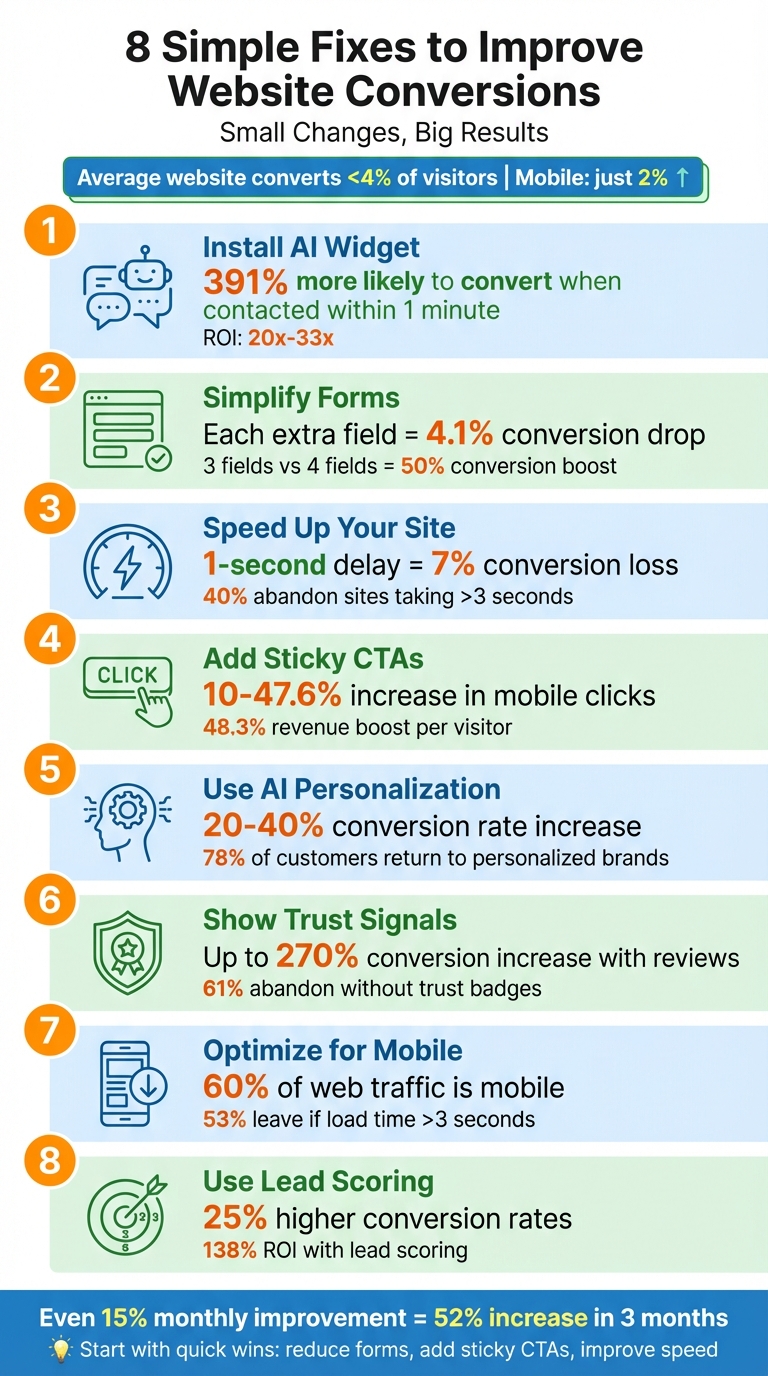
8 Simple Fixes to Improve Website Conversion Rates
15 Conversion Rate Optimization Tips That Will 2x Your Sales Overnight
sbb-itb-b3fe1da
1. Install LeadPilot AI Widget for Instant Lead Capture
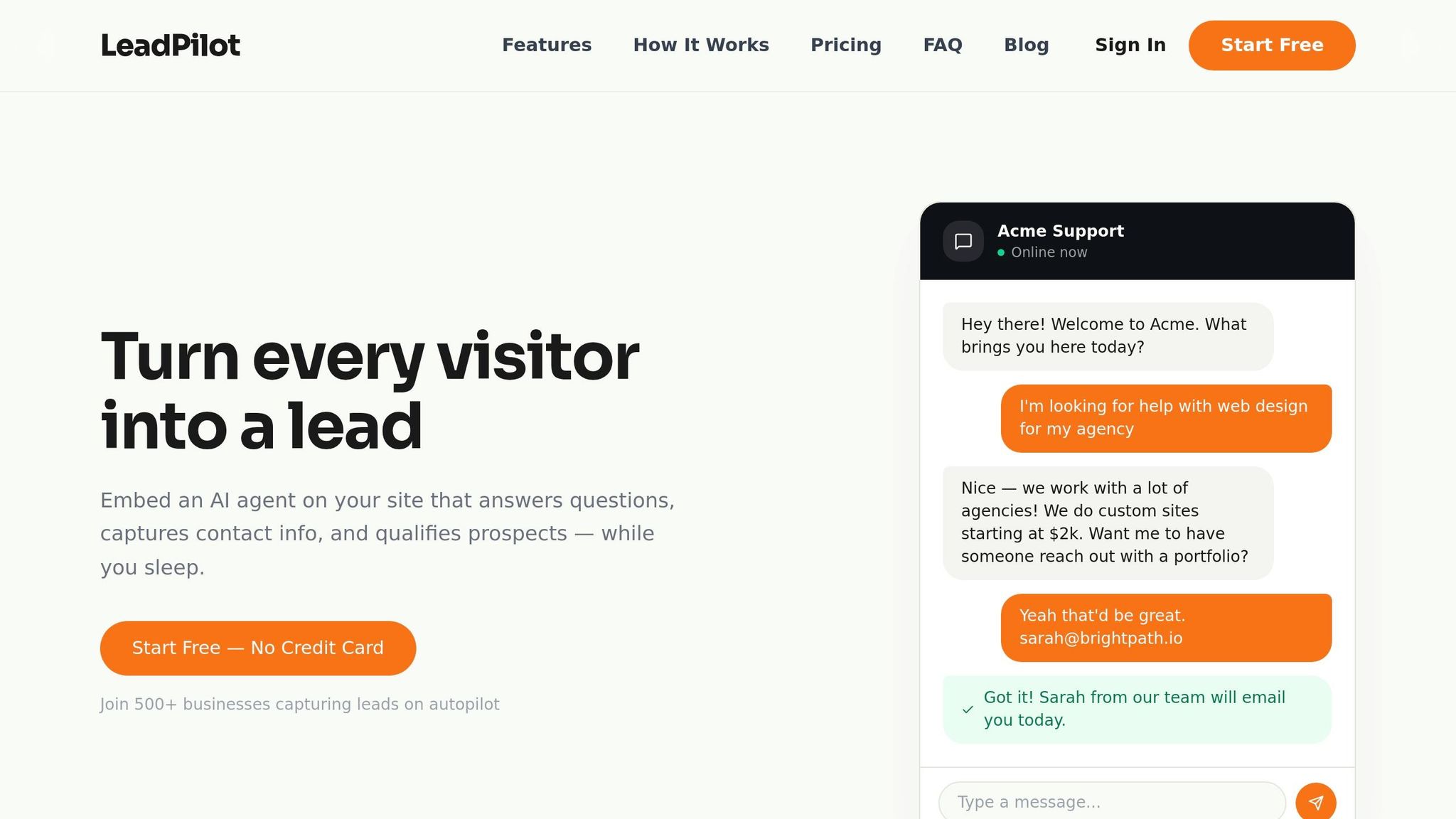
The LeadPilot AI Widget is designed to engage visitors who are most likely to convert - think of those browsing pricing pages or hovering near checkout. Instead of overwhelming them with long, multi-field forms (which can slash conversions by up to 50%), it keeps things simple by asking for just a phone number or email. This streamlined approach reduces friction, addressing the fact that 67–81% of visitors abandon traditional forms.
Easy Setup, No Expertise Needed
Getting started is a breeze. All it takes is adding a single line of code to your site, and voilà - the widget is live. What’s even better? The AI does the heavy lifting by scanning your website to understand your products, services, and FAQs. This means it can answer visitor questions accurately without needing hours of manual setup or training. It’s a quick way to start capturing leads without any headaches.
Boosting Conversion Rates
Speed is everything when it comes to lead conversion. Did you know that leads contacted within one minute are 391% more likely to convert? Plus, being the first to respond gives you a massive edge, with 78% of deals going to whoever reaches out first. By engaging visitors instantly, the widget not only improves conversions but also sets you up for efficient lead management.
Affordable and Effective
At just $49 per month for up to 1,000 conversations - or even a free plan with 50 conversations - LeadPilot delivers serious value. With a potential ROI of 20x–33x, it’s a cost-effective alternative to hiring a virtual assistant, which can run you $800–$2,000 per month.
Perfect for Any Business Size
Whether you’re a solo entrepreneur or running a larger operation, LeadPilot adapts to your needs. For individual consultants, it works around the clock to capture leads. Agencies can take advantage of the $199 Scale plan, which includes unlimited agents, conversations, and even white-label branding. It’s a solution that grows with your business.
2. Reduce Form Fields to Minimize Friction
Every extra field on a form demands more attention from your visitors, and that added effort can derail their momentum. The stats are clear: each additional field decreases your conversion rate by an average of 4.1%. Even more striking, over 67% of visitors will abandon a form altogether if it feels too cumbersome.
Impact on Conversion Rates
Streamlining your forms can lead to dramatic results. For example, cutting a form from four fields to three can boost conversions by nearly 50%. Even removing just one unnecessary field might increase conversions by 10–15%. Considering that the average form conversion rate across industries sits at a low 1.7%, optimizing forms can be a game-changer. In fact, companies that simplify their forms have seen conversion increases of up to 160%.
"The difference between a 3% and 6% form conversion rate... means doubling your lead volume without spending an extra dollar on traffic." – Orbit AI
These changes aren’t just small improvements - they can completely transform how effectively your site captures leads.
Ease of Implementation
Simplifying your forms doesn’t have to be complicated. Start by applying the "Need vs. Nice-to-Have" test: Is each field absolutely necessary for initial follow-up? If the answer is no - like asking for a job title or budget - remove it. You can always gather more details later. Another quick fix is consolidating fields. For instance, replace separate "First Name" and "Last Name" fields with a single "Full Name" field.
For mobile users, ensure forms are optimized for ease of use. Use input types like type="tel" for phone numbers so their keyboard switches to numeric automatically. These small tweaks can make a big difference in user experience.
Cost-Effectiveness
Form optimization delivers one of the highest returns in digital marketing, with an ROI ratio of 1:23. This isn’t about spending more on ads or traffic - it’s about making the most of the visitors you already have. According to Melanie Sanders, Lead Generation Director at SiriusDecisions:
"Most B2B companies waste 30-40% of their marketing budget because their forms scare off potential leads before they even enter the sales process".
For a mid-sized B2B company, high-friction forms can lead to losses averaging $380,000 annually. The good news? Simplifying forms costs little to nothing to implement. Once your forms are streamlined, the next step is ensuring your pages load quickly to keep users engaged.
3. Speed Up Your Pages with Image Compression and CDN
Images can account for a massive 50–80% of your page's weight, significantly slowing down load times and negatively impacting conversions. Did you know that just a 1-second delay in page load time might decrease conversions by 7%? Even more alarming, 40% of users will abandon a site if it takes more than 3 seconds to load. On the flip side, websites that load in 1 second can achieve conversion rates three times higher than those that take 5 seconds.
Impact on Conversion Rates
Consider this: Amazon found that every 100ms delay in load time decreased sales by 1%. For a business generating $200 million annually, a 1-second delay could mean losing over $22 million in revenue. That’s a staggering amount. One of the simplest ways to address this is through image optimization. Switching from older formats like JPEG to WebP can shrink file sizes by 25–35%, while AVIF files can cut them down by as much as 50%.
Ease of Implementation
Optimizing images doesn’t have to be complicated. Free tools like Google’s Squoosh.app let you manually compress images directly in your browser - no need to upload files to a server. If you’re a WordPress user, plugins like EWWW Image Optimizer or ShortPixel can handle compression automatically as you upload images. A quick win? Add the loading="lazy" attribute to images that appear below the fold. This ensures they only load when needed, speeding up the initial page load.
For global audiences, using a CDN (Content Delivery Network) like Cloudflare can make a huge difference. CDNs deliver images from servers closest to your visitors, reducing latency and improving load times. Cloudflare even offers a robust free plan to get you started.
Cost-Effectiveness
The best part? Many image optimization tools are free or very affordable. ImageOptim (for Mac) and Caesium (for Windows) provide unlimited local compression at no cost. If you need more advanced solutions, ShortPixel offers plans starting at just $4.99 per month for 5,000 images, while Bunny CDN charges around $0.01 per 1,000 images on a pay-as-you-go basis.
Here’s a real-world example: In January 2025, STAFFLINK used Tinify CDN to optimize around 200GB of high-resolution property images. This not only sped up their website but also improved their import process. Project Manager Matt Neal shared:
"We serve up about 200GB of images alone from one website. So it didn't just speed up the website when we use Tinify CDN, it was speeding up that import process".
4. Add Sticky Call-to-Action Buttons
Adding a sticky call-to-action (CTA) button to your website is a straightforward way to keep your CTA visible at all times. A sticky CTA is a button that stays fixed on the screen as users scroll, ensuring they don’t need to hunt for it when they’re ready to take action. This feature is especially handy on mobile devices, where scrolling is constant, and users might otherwise miss the opportunity to engage.
Impact on Conversion Rates
Sticky CTAs have been shown to significantly improve performance. A/B testing reveals that they can increase mobile clicks and overall conversions by anywhere from 10% to 47.6%. On long-form pages, sales have jumped by as much as 25% after adding sticky CTAs. One standout example even saw a 48.3% increase in revenue per visitor by using sticky "Add to Cart" buttons.
Ease of Implementation
Setting up sticky CTAs is a quick and simple process. With most website platforms and page builders offering built-in tools, you can implement one in less than 15 minutes using widgets or basic CSS. For mobile, placing the button at the bottom-center of the screen puts it within easy reach of users' thumbs. On desktop, a sticky header with the CTA on the right-hand side tends to work best. Make sure the button is in a high-contrast color so it stands out against your site’s design.
Cost-Effectiveness
Sticky CTAs are an affordable way to boost conversions. For instance, a small business could see 15 additional leads each month, translating to an annual value of $18,000. Since this approach focuses on converting existing traffic, there’s no need to increase ad spending or drive more visitors to your site. The tools required are often free or low-cost, and because sticky CTAs use lightweight JavaScript that loads asynchronously, they won’t slow down your site. Businesses have reported a 40% improvement in marketing ROI after implementing sticky CTAs, making it a smart and budget-friendly choice.
Next, we’ll dive into how AI-powered personalization can take user engagement to the next level.
5. Use AI-Powered Personalization
AI-powered personalization adjusts content in real-time based on visitor behavior, creating tailored experiences that help drive conversions. By analyzing actions like scroll depth, time spent on a page, and referral sources, AI can dynamically modify headlines, product recommendations, and calls-to-action (CTAs). For instance, visitors arriving from LinkedIn might see messaging geared toward B2B audiences, while those from Facebook could encounter content designed for consumers - all without the need to create separate pages manually.
Impact on Conversion Rates
The data is clear: personalized websites often experience conversion rate increases ranging from 20% to 40%. Additionally, 78% of customers are more likely to return to brands offering personalized experiences, and 67% of new shoppers rely on tailored recommendations to guide their purchases. AI can even predict when a visitor is about to leave your site and intervene with timely offers - like free shipping - to keep them engaged.
Ease of Implementation
Getting started with AI personalization is straightforward. Most tools require just a simple JavaScript snippet for integration. Begin by focusing on high-traffic pages, such as your homepage or pricing page, and test one feature - like dynamic headlines or personalized product suggestions. The AI does the rest, analyzing visitor behavior in milliseconds and updating content automatically. This eliminates the need for complex rule-building or manual segment updates.
Cost-Effectiveness
AI personalization delivers impressive results without breaking the bank. Businesses using these tools have cut customer acquisition costs by up to 50%, increased revenue by 15%, and improved marketing efficiency by 30%. Unlike traditional A/B testing, which can take weeks to yield insights, AI systems optimize content in real-time and can manage up to 50 experiments simultaneously. Affordable options are available, too. For example, Zoho PageSense starts at $12/month, and Shopify Magic is included in paid plans starting at $19/month.
Scalability for Different Business Sizes
AI personalization adapts effortlessly to businesses of all sizes. Small businesses can use built-in features from platforms like Shopify or HubSpot to tackle one use case at a time. Mid-sized companies benefit from CRM-integrated tools that automate lead scoring and deliver customized content based on customer data. Larger enterprises can leverage advanced platforms like Adobe Target or Optimizely to unify personalization efforts across web, email, and mobile apps. Even small teams can create highly tailored experiences with these scalable solutions.
6. Display Trust Signals and Social Proof
Beyond improving layout and speed, earning user trust is essential for capturing leads. Trust signals - like security badges, customer reviews, and certifications - help reassure visitors that your business is credible and reliable.
The numbers back this up. In 2025, digital agency SearchBloom added trust badges and credit card icons to a client's website, leading to a 12.6% boost in conversions. After redesigning the product page layout, overall conversions surged nearly 27%. On the flip side, 61% of customers have abandoned purchases due to a lack of visible trust badges. Even more striking, showcasing customer reviews can increase conversion rates by up to 270%.
Impact on Conversion Rates
Different trust signals resonate at various stages of the buyer journey. For instance, SSL certificates - the padlock icon in your browser - and well-known payment logos (like Visa or PayPal) help reduce checkout anxiety by emphasizing transactional security. Meanwhile, star ratings and testimonials offer social proof, with 86% of customers citing social validation as the most influential factor in their decision to buy. For B2B businesses, case studies and client logos establish authority, while money-back guarantees provide hesitant buyers with a safety net that encourages them to proceed.
Strategic placement of these signals is key. For example, putting security seals near "Add to Cart" buttons or checkout forms can ease last-minute doubts. Using specific numbers - like "4,127 customers" - adds credibility. Including a mix of positive and occasional negative reviews can also enhance authenticity; a perfect score across the board might come off as fake.
Ease of Implementation
Adding trust signals doesn’t have to be complicated. SSL certificates are free through providers like Let's Encrypt. Review widgets can automatically pull in real-time feedback from platforms like Google, Yelp, or G2, cutting down on manual updates. Social proof notification tools often require just a small JavaScript snippet and even offer free plans. If you're using platforms like Shopify, Wix, or WordPress, most trust signal apps can be installed with just a single click. To avoid overwhelming your audience, start by integrating one trust signal at a time.
7. Make Your Site Mobile-Friendly
With over 60% of web traffic now coming from mobile devices, it's clear that a mobile-friendly website isn't just a nice-to-have - it's essential. Yet, the average mobile conversion rate lags behind desktop at just 2%. If your site isn't optimized for mobile, you're essentially turning away potential customers.
Impact on Conversion Rates
The data paints a stark picture. In 2025, a Denver-area home services company and Sarah's Bakery saw striking improvements in mobile conversions after adopting mobile-first designs. The home services company boosted its conversion rate from 1.2% to 3.8%, while Sarah's Bakery saw a 150% jump in orders. These examples highlight the direct impact mobile optimization can have on your bottom line.
Speed plays a massive role here. If your site takes longer than 3 seconds to load, 53% of mobile users will leave. Even a delay of just 1–3 seconds can increase bounce rates by 32%, and a single second of lag can slash conversions by 7%. With mobile commerce making up 59% of global eCommerce sales, every second matters.
But speed isn’t the only factor - usability matters too. Small tap targets, long forms, and endless scrolling frustrate users. To improve usability, aim for tap targets of at least 48×48 pixels, use a minimum font size of 16px, and streamline navigation with concise menus. Simplifying forms can also make a big difference. For instance, replacing long forms with multi-step processes or asking only for essentials like name, email, and phone can significantly boost conversions.
One striking example? Expedia added $12 million to its annual profit by removing a single unnecessary field ("Company Name") from its mobile booking form. Simple changes can deliver huge results.
Ease of Implementation
The good news is that most mobile optimizations are straightforward and affordable. Compressing images to under 200 KB (preferably in WebP format), enabling lazy loading for media, and adding sticky call-to-action buttons that stay visible as users scroll are all relatively easy fixes. For businesses using template-based sites, costs typically range from $500 to $2,000, making these changes accessible even for smaller budgets.
Testing is key to ensuring everything works as intended. While tools like Chrome DevTools can simulate mobile layouts, testing on actual devices often uncovers hidden issues.
"Mobile-first design is not optional. Over 60% of web traffic comes from phones." – David Drewitz, Founder, Creative Options Marketing
Google's mobile-first indexing means your site's mobile version now dictates your search engine ranking. So, a poor mobile experience doesn’t just hurt conversions - it can also tank your visibility in search results.
8. Use LeadPilot Smart Lead Scoring and Alerts
Smart lead scoring is a game-changer for refining lead quality and boosting conversions. Not all leads are created equal, and identifying serious buyers versus casual browsers can make a huge difference. LeadPilot's AI takes this to the next level by analyzing hundreds of data points to highlight prospects most likely to convert. Then, it instantly alerts your sales team, ensuring they can act quickly.
Impact on Conversion Rates
The numbers speak for themselves: Companies using AI-driven lead scoring see 25% higher conversion rates. For B2B businesses, the results are even more impressive - 50% more leads converted at 33% lower cost per acquisition, with high-value prospects identified with 98.39% accuracy.
Speed is just as important as accuracy. Reaching out to a lead within five minutes increases your chances of connecting by 100× compared to waiting 30 minutes. LeadPilot’s instant alerts - delivered via Slack, SMS, or email - ensure your team connects while the lead is still engaged.
"Lead scoring is no longer optional - it's the intelligence layer that determines whether your lead generation investments pay off." – Conversion System
LeadPilot combines demographic data (like job title or company size) with behavioral signals (such as repeated visits to your pricing page). For instance, a visitor who checks your pricing page three times in a week will score higher than someone who just downloads a blog post. Negative scoring also filters out low-quality leads, like competitors or student email addresses, so your team focuses on prospects that matter. This smart scoring system works seamlessly with LeadPilot’s real-time alerts to ensure no high-value lead slips through the cracks.
Cost-Effectiveness
LeadPilot doesn’t just improve conversions - it also saves time and money. Sales reps often waste up to 60% of their time on non-selling tasks. With LeadPilot’s no-code Visual Builder, marketers can set up scoring rules in minutes without needing developer support. Automated alerts eliminate the need for manual tracking, freeing up your team to focus on closing deals.
The return on investment is undeniable. Companies using lead scoring see a 138% ROI, compared to just 78% for those that don’t. Rule-based scoring alone can boost lead generation ROI by 77%. For example, a B2B fintech client using LeadPilot assigned 30 points for pre-qualification forms and 10 points for return visits. Once leads hit 75 points, the system sent personalized emails and notified sales via Slack. This approach led to a 34% faster response time and a 22% increase in qualified appointments within two months.
Scalability for Different Business Sizes
LeadPilot’s scoring system is designed to grow with your business. Start with 3–5 key signals, like job title or pricing page visits, and expand to more complex scoring models as your needs evolve. The platform supports unlimited team members, making it easy for sales and marketing teams to collaborate.
Here’s a breakdown of the plans:
- Starter plan ($49/month): Ideal for small businesses, with basic lead scoring and email notifications.
- Growth plan ($99/month): Perfect for growing companies, offering lead qualification across three AI agents.
- Scale plan ($199/month): Tailored for enterprises, featuring unlimited agents and white-label branding for client-facing deployments.
LeadPilot processes data at a scale far beyond what human teams could manage manually, ensuring your business stays ahead.
Conclusion
Low conversion rates aren't set in stone. The strategies outlined here - from adding LeadPilot's AI widget to leveraging smart lead scoring - can work together to transform casual visitors into qualified leads. Even a modest 15% monthly improvement adds up to a 52% increase in just three months.
Start by assessing your current metrics. Use tools like Google Analytics 4 to track conversion rates, bounce rates, and page load speeds before making any changes. This baseline helps you measure the effectiveness of your efforts. From there, focus on quick wins such as reducing form fields, adding sticky CTAs, and improving page speed. For example, in 2023, Expedia boosted annual revenue by $12 million by simply removing one unnecessary form field from its booking process. Small adjustments like these, combined with advanced tactics like smart lead scoring, create a smooth pathway for lead generation.
Tackle changes step by step. In the first 30 days, focus on high-impact, low-effort fixes. By days 31–60, incorporate trust signals and personalization. Finally, in days 61–90, scale your efforts with A/B testing and advanced features.
"Conversion rate optimization (CRO) is the missing multiplier that separates websites that quietly exist from those that print money." – Coko Agency
Make it a habit to review your progress weekly. Analyze your top-performing landing pages using heatmaps and session recordings to uncover why users act the way they do. Keep in mind that even a 1-second delay in page load time can slash conversions by 7%, and 53% of mobile users will abandon a site that takes more than 3 seconds to load. Regular monitoring, testing, and refining are key to achieving sustainable improvements.
FAQs
Which fix should I try first for the fastest conversion lift?
If you're looking to see results quickly, start by refining your call-to-action (CTA). Position it above the fold - this ensures it's one of the first things visitors see. Use clear, action-driven language that motivates users to take the next step.
These small tweaks can make a big difference, often leading to an immediate increase in both engagement and conversions.
How can I measure conversion improvements in GA4?
To gauge how your conversion efforts are paying off in GA4, focus on tracking key metrics like conversion rates over time. Start by setting up specific conversion events tailored to your goals. Then, compare the data from before and after implementing changes to see how well they’re working.
One thing to note: GA4 often has a data processing delay of 24–48 hours, so give it some time before analyzing updates. Make it a habit to regularly review event reports - these will give you a clear picture of how your adjustments are influencing performance.
What’s the easiest way to improve mobile conversions?
Optimizing your mobile site’s user experience is one of the simplest ways to boost mobile conversions. Start by improving load times - your site should load in under 3 seconds. Slow pages can frustrate users and lead to drop-offs. Make the checkout process easier by offering options like guest checkout and digital wallets, which streamline payment and reduce friction.
Design also plays a big role. Ensure buttons are at least 48×48 pixels and positioned within easy thumb reach for better usability. Adopting a mobile-first approach and ensuring your site is fully responsive can further enhance engagement and drive conversions. Small changes like these can make a big difference in how users interact with your site.