Website Lead Capture: 10 Best Practices for 2026
Practical tactics to boost website lead conversion with AI widgets, chatbots, smart scoring, mobile-first and interactive lead magnets.
Website Lead Capture: 10 Best Practices for 2026
Website lead capture has evolved significantly in 2026, driven by AI tools, stricter privacy laws, and changing user behaviors. To stay competitive, businesses must focus on smarter, faster, and more personalized methods for engaging website visitors and turning them into qualified leads. Here's a quick summary of the top strategies:
- AI-Powered Website Widgets: Replace static forms with AI-driven tools that interact with users based on behavior, boosting conversions by up to 105%.
- Smart Lead Scoring: Use AI to prioritize prospects based on intent and behavior, improving conversion rates by 25%.
- Simplified Forms: Reduce friction by keeping forms short and using AI to auto-fill details, increasing completion rates by 50%.
- Multi-Step Forms: Break long forms into smaller steps, achieving up to 300% higher conversions.
- Real-Time Visitor Identification: Capture anonymous visitors and notify sales teams instantly, increasing pipeline opportunities.
- Personalized Popups: Tailor messages based on user behavior, referral source, and location, improving engagement by 45–60%.
- AI Chatbots: Engage visitors with bots trained on your content, delivering 4x higher conversion rates than static forms.
- Interactive Lead Magnets: Offer tools like quizzes or ROI calculators instead of static PDFs, achieving 25–40% conversion rates.
- Mobile-First Design: Optimize forms for mobile, ensuring thumb-friendly layouts and reducing abandonment rates by up to 80%.
- Gamified Popups: Use spin-to-win wheels or quizzes to increase opt-ins by 10–25x compared to traditional popups.
Why It Matters
With AI transforming how businesses collect and qualify leads, these strategies help you respond faster, reduce costs, and convert more visitors into customers. Whether it's simplifying forms, using AI chatbots, or leveraging gamification, these tools ensure your website stays effective in an AI-driven era.
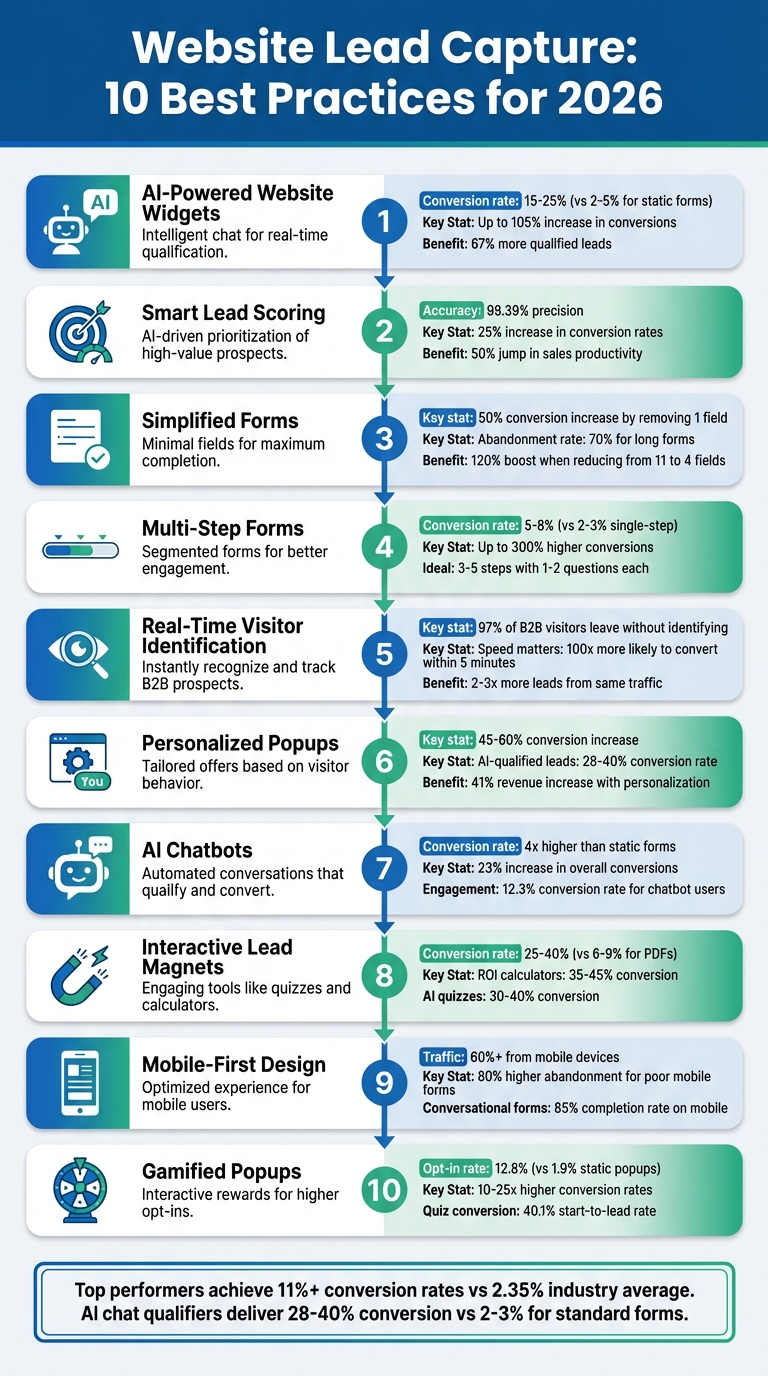
10 Website Lead Capture Best Practices for 2026: Key Statistics and Conversion Rates
The Best 100% AI Lead Generation Strategy for 2026
sbb-itb-b3fe1da
1. Deploy AI-Powered Website Widgets for Instant Lead Capture
Static forms often fall short when it comes to engaging visitors. AI-powered website widgets, on the other hand, actively interact with users by analyzing their behavior. For instance, they might initiate a conversation when someone spends more than 30 seconds on your pricing page or scrolls through 70% of a blog post. Instead of passively waiting for prospects to navigate to your contact page, these widgets step in at the exact moment a visitor shows interest. This kind of proactive engagement lays the groundwork for the advanced features discussed below.
AI-Powered Functionality and Automation
Modern AI widgets are more than just chat tools - they're smart systems designed to gather and qualify leads in real time. They can ask follow-up questions based on user responses, collect detailed lead data, and even append firmographic details like company size or industry. By analyzing sentiment and intent during interactions, these widgets quickly identify high-value prospects who are ready to buy. When a potential hot lead is detected, the system immediately notifies your sales team via Slack, SMS, or email. This speed matters - 78% of customers tend to buy from the first company that responds.
Impact on Lead Conversion Rates
The results speak for themselves. AI-powered chatbots achieve lead conversion rates ranging from 15% to 25%, compared to the 2% to 5% rates typically seen with static forms. Proactively engaging visitors can lead to conversion increases of up to 105%. Businesses using these tools report 67% more qualified leads. Even small tweaks, like removing an unnecessary form field, can boost conversions by as much as 50%. These numbers clearly show the advantage of active, behavior-driven engagement over passive methods.
Ease of Integration with Existing Websites
Integrating these widgets into your website is easier than ever. By 2026, most AI widgets are no-code solutions, meaning you don’t need a development team to get started. With just a single code snippet, you can deploy them and connect them to CRMs like Salesforce or HubSpot in minutes. Platforms like WordPress, Webflow, and Squarespace support these widgets seamlessly - you simply paste the code into a custom HTML block without disrupting your site’s core structure. Plus, their responsive design ensures they work perfectly across all screen sizes.
User Engagement and Personalization Capabilities
AI widgets excel at creating tailored experiences. Using progressive profiling, they recognize returning visitors and remember past interactions, asking only for new information. Real-time conversational branching logic ensures visitors aren’t bogged down with irrelevant questions, reducing friction. Intent-based triggers take personalization even further. For example, if a visitor hesitates or repeatedly interacts with high-value pages, the widget adapts its messaging to address their specific needs. This level of personalization transforms lead capture into a more meaningful and context-aware process, giving businesses a clear edge in 2026.
2. Use Smart Lead Scoring in Conversational Tools
Smart lead scoring integrated into conversational tools takes the guesswork out of prioritizing prospects. By automatically ranking leads based on their behavior and responses, it ensures that someone actively engaging - like exploring your pricing page, downloading a case study, or asking detailed implementation questions - gets immediate attention, while casual visitors are deprioritized.
AI-Powered Functionality and Automation
Today’s conversational AI tools are built to analyze a variety of data points, including sentiment, urgency, and topics discussed. They can assign scores within seconds. Unlike traditional static rules, these systems rely on machine learning to spot patterns that signal conversion potential. For instance, a visitor mentioning budget concerns while reviewing a key product page might be flagged as more likely to convert than someone casually browsing less relevant sections.
These tools also incorporate qualification questions seamlessly, using BANT criteria (Budget, Authority, Need, Timeline) without disrupting the user experience. When a lead shows strong intent - like expressing urgency or asking about pricing - the AI updates their score in real time and triggers specific actions. For example, a lead scoring 90+ might prompt an SMS alert to your sales team, while those scoring 70+ could be routed to a Slack channel for follow-up. This automation not only simplifies lead qualification but also boosts conversion opportunities.
Impact on Lead Conversion Rates
The accuracy of AI-powered lead scoring is impressive, with some systems identifying high-value prospects with up to 98.39% precision. Businesses using these systems report a 25% increase in conversion rates and a 15% reduction in cost per lead. Sales teams also see a 50% jump in productivity, as they can focus their energy on leads that are most likely to close.
The real-world results speak volumes. In 2026, Diskat, a Guatemalan retail business, implemented AI agents via respond.io to handle inbound leads from platforms like WhatsApp, Messenger, and TikTok. The AI managed 90% of inquiries and achieved an 81.4% conversion rate from qualified conversations. Similarly, Automax, a luxury car dealership in the UAE, used AI to process 6,000–8,000 leads monthly from WhatsApp ads. By pre-qualifying leads based on language and location before handing them off to humans, they achieved a 10% boost in conversions and a 42.5x ROI on their campaigns.
User Engagement and Personalization Capabilities
Smart lead scoring tools don’t stop at ranking prospects - they also personalize follow-ups to keep engagement high. By classifying leads based on behavior and preferences, these systems enable tailored outreach.
Progressive profiling plays a key role here. Instead of overwhelming users with questions upfront, conversational tools collect information gradually over multiple interactions. Each new data point refines the lead’s score and enriches their profile without creating friction. Additionally, the system uses score decay, automatically lowering a lead’s priority after 30 days of inactivity. This keeps the focus on fresh, high-intent prospects and ensures your sales team knows exactly who to target first. With this approach, your pipeline stays organized and ready for the next step - streamlined form design practices.
3. Keep Forms Short with Only Required Fields
Simplifying your forms is more important than ever in the age of AI-driven lead capture. Every extra field you add creates more friction for users. In fact, nearly 70% of people abandon forms before completing them. Each additional question increases the effort required and gives users another reason to leave.
Impact on Lead Conversion Rates
The numbers paint a clear picture. Removing just one unnecessary field can increase conversion rates by up to 50%. Even more striking, reducing a form from 11 fields to just 4 can boost conversions by 120%. For B2B businesses, each extra field decreases conversion rates by an average of 4.1%.
Certain fields are especially problematic. For example, requiring a phone number causes 37% of users to abandon the form. Making it optional reduces abandonment from 39% to just 4%. Similarly, insisting on a business email instead of allowing personal emails can cut conversions by 52%. With the average cost per lead projected to reach $391.80 by 2026, every lost lead takes a toll on your bottom line. Using AI to streamline forms can significantly improve user experience and reduce abandonment rates.
AI-Powered Functionality and Automation
AI tools can help you identify which fields are truly necessary. Machine learning models analyze historical conversion data to pinpoint the lead attributes - like company size or budget authority - that actually drive results. This allows you to eliminate fields that don't add value.
AI data enrichment tools can also auto-fill key details like company size, industry, and tech stack based on a single email address. This reduces form completion time by 30–50% while still capturing essential information. Additionally, progressive profiling tracks returning visitors, so they aren’t asked the same questions twice. Over time, this builds a complete user profile without overwhelming anyone.
User Engagement and Personalization Capabilities
Short forms show users that you respect their time, which leads to higher engagement. A single-column, minimal design can be completed 15.4 seconds faster than cluttered multi-column layouts. By removing non-essential questions, you’re not just simplifying the process - you’re showing users that their attention matters.
Stick to the basics: request only a name and email upfront, and evaluate whether any additional fields are absolutely necessary for the next step. Use smart defaults, like auto-selecting the country based on IP, and keep options simple with radio buttons for 2–4 choices. Companies that optimize form length and design achieve conversion rates above 11%, compared to the industry average of just 1.7%. This streamlined approach lays the groundwork for the future of form design, including multi-step forms that balance simplicity with comprehensive data collection.
4. Break Forms into Multiple Steps
Long forms can feel daunting and often lead to users abandoning the process altogether. Splitting these forms into smaller, sequential steps creates a more manageable and engaging experience. This step-by-step approach not only makes the process feel less overwhelming but also increases the likelihood of users completing the form, ultimately improving conversion rates.
Impact on Lead Conversion Rates
Multi-step forms consistently outperform single-step forms when it comes to lead conversion. While single-step forms typically convert at rates of 2–3%, multi-step forms can achieve rates of 5–8% or more. In fact, a well-designed multi-step form can boost conversions by up to 300% compared to traditional long forms. This success is tied to the "foot-in-the-door" effect: once users complete an easy initial step, they’re more likely to continue through the rest of the process.
Breaking forms into smaller chunks reduces the mental effort required. Research suggests users can comfortably handle about four items at a time. By limiting each step to 1–2 questions, users can focus better without feeling overwhelmed. Ideally, forms should have three to five steps to strike the right balance between simplicity and efficiency. Incorporating AI to customize each step can further enhance these benefits.
AI-Powered Functionality and Automation
AI takes multi-step forms to the next level by introducing features like conditional branching logic. For example, if a user selects "Enterprise", the form can skip budget-related questions and move directly to inquiries about implementation timelines.
Real-time lead scoring is another AI-powered feature that evaluates responses as they’re entered. For instance, a "C-Level" job title might add 20 points to a lead’s score, flagging them as high-value for immediate follow-up. Additionally, AI can auto-fill fields by pulling firmographic data - like industry or funding status - based on a user’s business email domain. This automation can cut form completion time in half.
User Engagement and Personalization Capabilities
Starting with easy, non-intrusive questions - like "What is your primary goal?" - helps build trust before asking for more sensitive details like an email address or phone number. Adding a progress bar helps users see how far along they are, reducing uncertainty and encouraging them to continue.
Inline validation provides immediate feedback, such as confirming a valid email address with a green checkmark, so users can fix errors as they go rather than after submitting the form. For mobile users, ensuring buttons and input fields are large enough - at least 44×44 pixels - can prevent frustrating tap errors and make the experience smoother.
5. Set Up Real-Time Visitor Identification and Alerts
Did you know that 97% of B2B visitors leave your site without ever identifying themselves? Relying solely on form submissions means you're only scratching the surface of your potential audience. Real-time visitor identification steps in to bridge this gap, automatically capturing prospects who don't actively fill out forms. This approach complements earlier proactive engagement strategies by uncovering those "silent" visitors.
AI-Powered Functionality and Automation
Modern tools leverage two types of matching to identify visitors: deterministic matching (using verified first-party data with over 95% accuracy) and probabilistic matching (based on IP addresses and device fingerprints, with 60–80% accuracy). These tools go beyond basic tracking, analyzing behaviors like scroll depth, mouse movements, and repeat visits to assess intent. For instance, a visitor spending time on your pricing page is flagged as high intent, while someone quickly bouncing from a blog post is not. High-intent visitors can trigger instant notifications via Slack, CRM, or even SMS, allowing your sales team to act while the prospect is still engaged.
The best systems can pinpoint details down to the person-level, not just the company-level. For example, instead of simply identifying a visitor as part of a specific organization, the system might reveal that a VP-level decision-maker spent several minutes reviewing your pricing page. This added context enables more precise and timely outreach.
Impact on Lead Conversion Rates
Timing is everything when it comes to converting leads. Data shows that leads contacted within five minutes are 100 times more likely to convert than those reached after 30 minutes. Even more compelling, the first vendor to respond wins the deal 78% of the time. Real-time visitor identification ensures your team gets notified the moment a high-value prospect engages with key content, giving you the edge in response time.
Additionally, identifying anonymous visitors can significantly boost your pipeline - up to two or three times more leads from the same traffic - without increasing your ad spend. This is crucial in today's B2B landscape, where buyers complete 70% of their decision-making process before ever reaching out to sales.
Ease of Integration with Existing Websites
The best part? These tools are incredibly easy to integrate. Adding a lightweight JavaScript snippet to your site (similar to installing Google Analytics) often takes less than two minutes and doesn't slow down your site. Many tools also sync seamlessly with CRMs like HubSpot or Salesforce, automatically creating contacts and triggering workflows.
You can configure triggers based on high-intent behaviors, such as viewing pricing pages, navigating multiple pages in one session, or returning to the site within 48 hours. Responses can be tiered: immediate outreach for visitors on key pages, and automated nurture sequences for those browsing general content. Leads can even be routed to the right sales rep based on factors like location, industry, or potential deal size.
User Engagement and Personalization Capabilities
Real-time identification gives you a complete picture of each visitor's journey - what pages they viewed, how long they stayed, and whether they’re returning visitors. This allows for highly personalized follow-ups. Instead of sending a generic message, your team can reference specific content the visitor interacted with, making the outreach feel relevant and thoughtful.
Sales reps also gain access to contact details like LinkedIn profiles and work emails, enabling immediate multi-channel engagement after a site visit. This level of personalization has been shown to increase revenue by 41% compared to traditional methods. Combined with features like AI chatbots and intent scoring, these tools ensure no high-value lead slips through the cracks.
For compliance, U.S.-based visitor identification tools adhere to federal laws and CCPA, as long as your privacy policy discloses tracking practices. Many also geofence EU traffic to comply with GDPR standards.
6. Personalize Lead Capture with Display Rules and Targeting
Presenting the same popup to every visitor isn’t just ineffective - it can actually push potential leads away. Instead, tailoring messages based on real-time signals like referral source, device type, location, and browsing behavior can make all the difference. These personalized approaches set the stage for the advanced AI features we'll dive into next.
AI-Powered Functionality and Automation
AI tools take personalization to the next level by analyzing user behavior in real time. Metrics like scroll depth, time spent on a page, mouse movements, and repeat visits help determine when a visitor is genuinely interested before engaging them.
Dynamic conversational forms are another game-changer. For example, if someone selects "Enterprise", the form instantly adjusts to show fields like "Company Name" and "Employee Count". AI-powered lead scoring evaluates prospects continuously, using both behavioral data and firmographic details, and sends high-value leads directly to sales teams via Slack or similar tools.
Some platforms even use reverse IP tracking to identify visitors from key target accounts. This allows for tailored engagement before those visitors fill out any forms.
Impact on Lead Conversion Rates
When campaigns feel personal and offer clear value, conversion rates can jump by 45–60%. Leads qualified through AI-driven conversational tools convert at rates of 28% to 40%, compared to just 2% to 3% for traditional static forms.
Progressive profiling also plays a big role. By reducing form friction and enriching profiles over time, it helps build better lead data. Even something as simple as removing a single unnecessary field - thanks to smart defaults or personalization - can boost form conversions by up to 50%.
User Engagement and Personalization Capabilities
Personalization isn’t just about improving conversions - it also reduces "popup fatigue." For instance, a visitor reading your blog might see an offer for a related content download, while someone checking out your pricing page gets a demo request form. Returning visitors can even be greeted by name, with pre-filled forms pulled from your CRM.
Conditional logic is another effective tool. It ensures fields only appear when relevant - like showing "Company Name" if "Enterprise" is selected. To streamline qualification, ask the most critical question early in the form. This way, even if the form isn’t completed, you can still route leads effectively.
"In 2026, successful lead capture is no longer about showing more forms - it's about showing the right experience, at the right moment, with real value behind it." - Esther Okunlola, Content Marketer, Poptin
Ease of Integration with Existing Websites
Modern AI lead capture tools make implementation straightforward, even for non-technical teams. With low-code or no-code options, marketing teams can design, test, and launch advanced forms without needing developer support. Many platforms also offer one-click integrations with CRMs like Salesforce and HubSpot, ensuring smooth data transfer and automatic contact creation.
Real-time alerts are another powerful feature. You can set up notifications - via Slack or email - when a high-scoring lead meets specific criteria, enabling your sales team to respond instantly.
7. Add AI Chatbots Trained on Your Website Content
An AI sales agent can transform how businesses engage with their website visitors. By training chatbots on your site’s content - whether through crawling URLs, analyzing sitemaps, or processing documents like PDFs - you can create an interactive tool that answers visitor questions with precision. This approach replaces outdated static forms, offering a more dynamic and engaging experience. Chatbots can handle inquiries about pricing, features, and even implementation details, helping bridge the gap between a visitor’s curiosity and their decision to convert.
AI-Powered Functionality and Automation
Modern AI chatbots don’t just respond - they engage. These bots qualify leads by asking one targeted question at a time, making the process effortless for users. They’re available 24/7, initiating conversations based on visitor behavior, such as time spent on a page or specific actions taken.
When a visitor shows serious intent, advanced bots can recognize complex inquiries and seamlessly transfer the conversation to your sales team via tools like Slack. Every interaction is logged and synced with your CRM automatically. Some platforms even offer One-Time Password (OTP) verification through email or phone to ensure the authenticity of each lead.
Sales teams waste time chasing poor leads. OTP verification ensures every lead in your CRM is genuine.
- Gopi Krishna Lakkepuram, Founder & CEO, Hyperleap AI
Impact on Lead Conversion Rates
The numbers speak volumes: AI chatbots can boost visitor-to-lead conversion rates by up to four times compared to static forms. Websites using chatbots have seen an impressive 23% increase in overall conversion rates. Shoppers who interact with AI chatbots convert at a rate of 12.3%, compared to just 3.1% for those who don’t engage. Additionally, 67% of businesses report increased sales, and 55% note an improvement in the quality of leads after implementing chatbots.
User Engagement and Personalization Capabilities
AI chatbots tackle "form fatigue" by delivering instant responses - even outside business hours - meeting the expectations of 59% of consumers who want answers within five seconds. These bots also gather valuable insights, such as the questions visitors ask and the pages they view, enabling personalized follow-ups.
For better results, keep the initial qualification process simple - limit it to 3–4 key questions before handing the lead off to your sales team. Offering value upfront, like a pricing guide or checklist, before requesting contact details can further improve engagement. Behavior triggers, such as activating the bot after a visitor spends 30 seconds on a high-priority page or scrolls through 60% of a product page, can also optimize interactions. This thoughtful design ensures chatbots not only engage visitors but also play a direct role in capturing leads.
Ease of Integration with Existing Websites
Integrating AI chatbots into your website is straightforward. Most platforms require just a single line of embed code and offer one-click CRM connections, making setup quick and painless. You can even configure real-time alerts to notify your team via Slack or email when high-value leads engage, ensuring no opportunity slips through the cracks. By streamlining integration, these tools make it easier than ever to enhance your website’s lead generation capabilities.
8. Offer Content Downloads and Free Trials in Exchange for Contact Info
Gone are the days when a 50-page PDF ebook could effectively capture leads. By 2026, static downloads are losing their appeal, with open rates dipping below 20%. Meanwhile, interactive, AI-driven lead magnets are taking center stage, boasting conversion rates of 25–40% - up to five times higher than traditional formats. People now expect immediate, tailored value instead of generic files that often go ignored.
Impact on Lead Conversion Rates
The shift to interactive tools is paying off in a big way. In January 2026, companies replacing static PDFs with interactive formats reported conversion rates skyrocketing from 6–9% to 34–41%. One SaaS company, for instance, saw its qualified leads soar from 15 to 680 per month. Similarly, a marketing agency’s AI Content Marketing Audit tool achieved a 37% conversion rate, generating 428 audits in just one month and delivering $127,000 in new business - a staggering 42:1 ROI.
Interactive formats consistently outperform static ones:
- AI-powered ROI calculators: 35–45% conversion rates
- AI quizzes: 30–40% conversion rates
- Automated audit tools: 28–35% conversion rates
Compare that to static PDFs, where checklists convert at just 5–12% and ebooks at 8–15%. The numbers make it clear: interactive content is the way forward.
AI-Powered Functionality and Automation
Today’s AI tools make creating downloadable assets faster and easier than ever. Using a three-stage process - extraction, formatting, and personalization - AI can transform blog posts into checklists, calculators, or swipe files in under 30 minutes. With a system of three AI agents, you could scan your top 10 blog posts and generate a library of 30–50 unique lead magnets in just one day.
These tools also streamline user interactions. They remember returning visitors, reducing friction by only asking for additional details during follow-up downloads. Some platforms even integrate AI-powered SDRs (sales development reps) into the process, qualifying leads immediately after a download and routing high-intent prospects directly to your sales team.
User Engagement and Personalization Capabilities
Matching your lead magnet to your audience’s intent is key. For example:
- Use checklists and calculators to attract awareness-stage leads.
- Offer mini-courses to build trust.
- Provide personalized audits to qualify prospects further.
Automated drip sequences, like 5-day mini-courses, convert leads into paying clients at rates two to three times higher than single-download strategies.
Keep your forms simple. Asking for just an email address can yield conversion rates of 35–40%. However, adding extra fields like phone numbers or company names can drop those rates to as low as 8–12%. Interactive tools also keep users engaged longer, with average time on page jumping to 3–5 minutes compared to just 12 seconds for static downloads. Plus, they’re far more shareable, with social share rates of 8–15% versus a mere 0.1% for static PDFs.
Pairing downloadable content with free trials can further enhance results. Free trials not only give prospects a direct experience with your product but also help identify high-intent leads for follow-up engagement.
"The era of static PDFs is over. Interactive, AI-powered lead magnets are the new standard - and they convert 3–5x better." - Magnetly
9. Design All Lead Capture Elements for Mobile First
When refining lead capture strategies, prioritizing mobile-first design is essential to ensure your efforts resonate with the majority of users accessing your content on mobile devices.
With mobile traffic accounting for over 60% of web activity, it's clear that mobile optimization is no longer optional. However, mobile forms often underperform by 27% compared to their desktop counterparts. This gap arises because many lead capture elements aren't designed for easy, thumb-friendly interaction. As we move toward 2026, optimizing for mobile devices is a critical step in boosting lead generation.
Impact on Lead Conversion Rates
Poorly optimized mobile forms can result in abandonment rates up to 80% higher than desktop versions. On the other hand, conversational forms - those that present one question at a time - achieve completion rates of 85% on mobile, compared to just 22% for traditional multi-field forms. Even small adjustments can make a big difference: enlarging CTA buttons can increase conversions by 9%, while removing just one unnecessary field can improve completion rates by 50%.
Single-column layouts also offer a speed advantage, being completed 15.4 seconds faster on average than multi-column designs. This efficiency is vital since over half of users (57%) are unlikely to recommend a business with a poorly designed mobile site. To further enhance usability, place key action buttons like "Submit" or "Next" in the bottom third of the screen, where they align naturally with thumb movements, reducing effort and keeping users engaged.
AI-Powered Functionality and Automation
AI tools have revolutionized mobile form design. Modern AI-powered form builders can automatically create mobile-optimized layouts from simple text inputs or PDFs. Features like smart auto-population, which uses cookies, URL parameters, and CRM data, can reduce form completion time by 30–50%. Real-time AI validation ensures errors are flagged immediately as users move between fields, cutting abandonment rates by 22%. Additionally, leveraging HTML5 input types (e.g., type="tel" or type="email") activates the correct mobile keyboards, minimizing entry errors and frustration.
User Engagement and Personalization Capabilities
To maintain user focus, progressive disclosure only shows fields relevant to previous answers, keeping the screen uncluttered. Touch targets should meet Apple's 44×44-pixel standard - ideally 48×48 pixels - to prevent accidental taps. Adding 8–16 pixels of spacing between clickable elements further enhances usability.
Visual feedback, such as green checkmarks, reassures users that their entries are correct, keeping them motivated. For longer forms, sticky positioning ensures the Submit button remains in the thumb-friendly zone as users scroll. Replace generic "Submit" text with action-oriented phrases like "Get My Free Guide" to clarify what users gain by completing the form.
By adopting a mobile-first mindset, you not only align with modern user behavior but also ensure your lead capture elements deliver consistent results across all devices.
"Your mobile form just cost you another lead... Mobile forms have abandonment rates up to 80% higher than desktop versions." - Orbit AI
10. Add Gamification to Increase Popup Engagement
Traditional popups are quickly losing their effectiveness in the fast-paced digital world. Many visitors simply ignore them, making them almost invisible. Gamification flips this script, turning a standard email capture into an interactive and engaging experience. By sparking curiosity and encouraging action, gamified popups achieve an average opt-in rate of 12.8%, compared to just 1.9% for static popups.
Impact on Lead Conversion Rates
Gamified features like spin-to-win wheels and scratch cards deliver conversion rates 10–25× higher than traditional popups. Why? Users view the rewards from gameplay as nearly twice as valuable as passive discounts. For instance, Overstockart's $100 coupon popup for purchases over $200 - under the leadership of VP of Ecommerce Amitai Sasson - tripled their email list, capturing 1,000 leads monthly. Similarly, Faguo’s spin-wheel campaign brought in 5,000 new leads per month.
The trick lies in balancing the prize distribution. Successful campaigns usually allocate 60–70% to low-value rewards, 20–30% to mid-value prizes, and 5–10% to high-value rewards. Interactive quizzes are another powerhouse, boasting a 40.1% start-to-lead conversion rate, making them one of the most effective gamified tools. These strategies not only boost conversions but also open doors to deeper user engagement.
User Engagement and Personalization Capabilities
Gamification isn’t just about fun; it’s a goldmine for collecting zero-party data - information users willingly share. By breaking the lead capture process into smaller steps, like quizzes or surveys before a spin, marketers can ease users into engagement while building detailed profiles. For example, clothing brand Asphalte uses an interactive product co-creation quiz to capture 4,000 new leads monthly from 60,000 visitors. Chief Revenue Officer Benjamin Mateo credits this quiz as their top source of organic lead generation.
B2B companies can also benefit. Tools like ROI calculators or maturity assessments not only qualify leads but also accelerate the sales process - some reporting a 45% faster sales cycle because prospects feel more connected to the solution. The formula is simple: let users engage with the game first and then gate the reward behind an email field. This encourages participation while maximizing data collection. With this data in hand, AI takes personalization to the next level.
AI-Powered Functionality and Automation
AI now plays a critical role in enhancing gamified experiences. It adapts these interactions in real time based on user behavior, referral sources, and browsing habits. Platforms equipped with AI-driven lead scoring can instantly identify high-value prospects and route them to sales teams. AI also powers dynamic branching logic, where follow-up questions adjust based on a user’s previous answers, creating a more tailored experience.
Real-time CRM synchronization ensures follow-up emails hit users’ inboxes within minutes of a "win", capitalizing on their excitement. AI even validates form entries on the spot, catching typos and filtering out disposable email addresses - important since gamified forms attract throwaway emails at 2–3× the rate of standard forms. With no-code platforms, marketers can launch branded gamification widgets in under two minutes using a single code snippet.
"The average opt-in rate for a static popup is 1.9%. The average for a gamified popup is 12.8%. Stop leaving 85% of your traffic on the table." - Bliz Team
Conclusion
Lead capture in 2026 is all about building trust and delivering value right away. The 10 best practices we've covered here are designed to work together to reduce friction, boost engagement, and focus your efforts on prospects who are ready to take action. By simplifying forms, using multi-step processes, and leveraging AI-powered tools, you can significantly cut down the barriers that lead to the common 67–70% form abandonment rate.
Top-performing companies see conversion rates exceeding 11%, while the average lingers around 2.35%. AI chat qualifiers, on the other hand, deliver an impressive 28–40% conversion rate, compared to the 2–3% typically seen with standard web forms. These numbers highlight the importance of modernizing your lead capture approach.
The rise of conversational interfaces and zero-party data collection mirrors a shift in how buyers behave. Around 70% of marketers report that leads now enter the funnel later in the buying process because prospects are doing their own AI-assisted research beforehand. This means your tools need to adapt on the fly - scoring leads based on their actions and routing high-intent prospects directly to sales.
Start by auditing your current lead capture funnel to identify where visitors drop off. From there, test one or two strategies, like adding a multi-step form or an AI chatbot, and track their impact before scaling up. Make sure your forms integrate with your CRM so leads are routed instantly, and follow-up happens within minutes. Use single-column layouts and action-driven button text like "Get My Free Guide", and ensure everything works seamlessly on mobile since over 70% of submissions now come from mobile devices.
FAQs
Which lead capture tactic should I implement first?
To kick off 2026 with a strong lead capture strategy, start by refining your website's lead capture forms. Pay attention to form design - make it visually appealing and user-friendly to encourage more sign-ups. Minimize any barriers that might discourage users, like overly long forms or unclear instructions.
Take it a step further by integrating AI-powered automation. This allows you to personalize the experience for each visitor, making the process feel tailored and engaging. You can also experiment with different approaches, such as multi-step forms (breaking the process into smaller, digestible steps), inline forms (embedding forms seamlessly within content), or chat-based conversational forms that mimic a natural dialogue. These methods not only keep users engaged but also help boost your conversion rates.
How do I stay GDPR/CCPA-compliant with visitor tracking?
To ensure compliance with GDPR and CCPA in 2026, it's crucial to adopt a privacy-first mindset. This means putting user consent at the forefront and strictly following regulatory requirements. Here are some essential practices to keep in mind:
- Obtain clear consent: Always get explicit permission before tracking user activity or collecting personal data.
- Be transparent: Inform users about what data you’re collecting, why you’re collecting it, and how it will be used.
- Provide choices: Offer clear opt-in and opt-out options to give users control over their data.
- Leverage privacy tools: Use solutions like consent management platforms or Global Privacy Control (GPC) to streamline compliance efforts.
Additionally, staying updated on evolving legal requirements is key. Regularly review your processes and integrate tools that respect user privacy to meet compliance standards while fostering trust.
How can I reduce fake or low-quality leads from popups?
To reduce the chances of collecting fake or low-quality leads through popups, prioritize lead validation and qualification methods. Use tools that rely on privacy-focused signals, intent-based triggers, and AI-powered validation to filter out unqualified entries. Be on the lookout for warning signs like mismatched geographic details or inconsistent information. Incorporating multi-step forms with built-in validation checks and leveraging AI-driven lead scoring can help you focus on capturing engaged, high-quality prospects.