The Ultimate Guide to Automated Lead Generation
How AI tools automate capturing, qualifying, and nurturing website leads, speed up response times, and boost conversion rates and ROI.
The Ultimate Guide to Automated Lead Generation
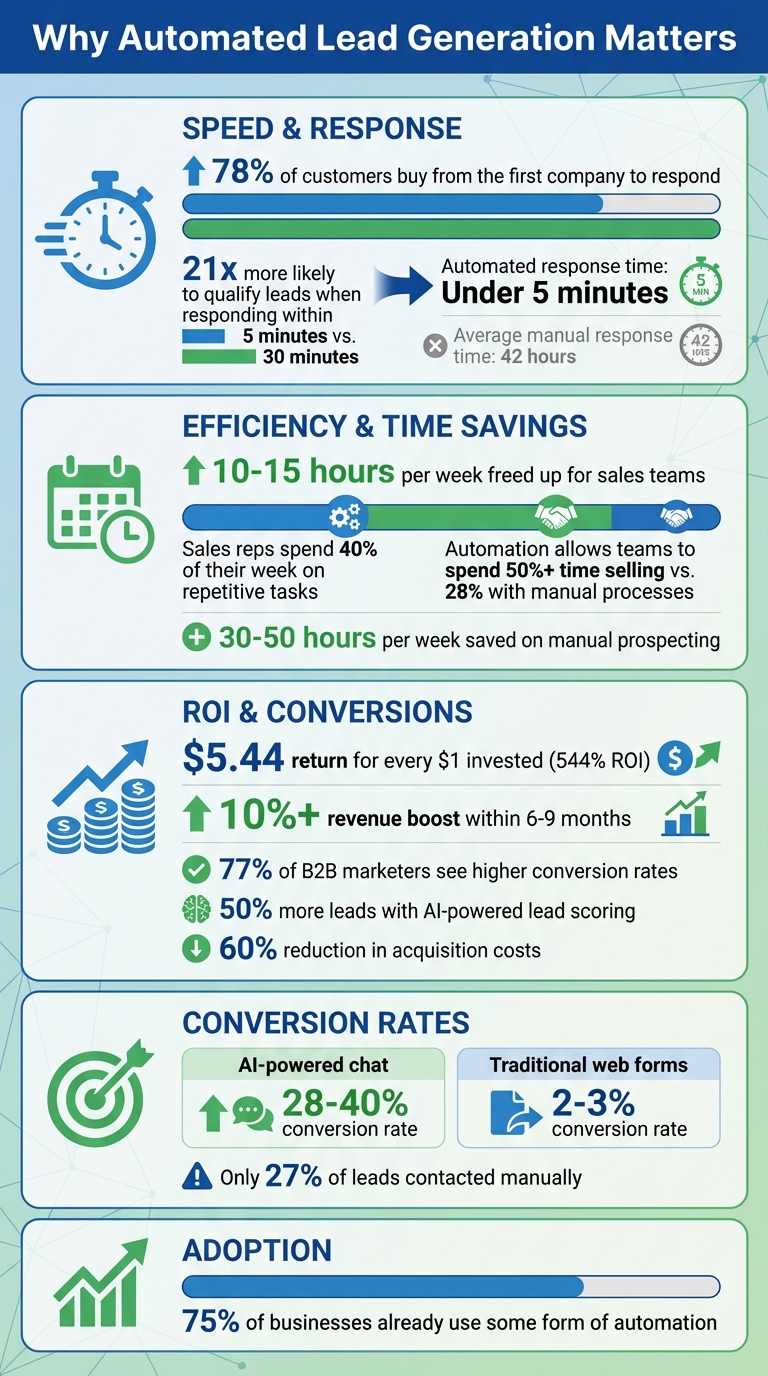
Automated lead generation uses AI tools and workflows to save time, qualify leads faster, and increase conversions. Businesses using automation see higher conversion rates, reduced costs, and faster response times - key factors when 78% of customers buy from the first company to respond. Here's why it matters:
- Speed: Responding within 5 minutes makes you 21x more likely to qualify leads versus waiting 30 minutes.
- Efficiency: Automation frees up 10–15 hours per week for sales teams by handling repetitive tasks.
- ROI: For every $1 invested in automated lead generation, businesses see an average return of $5.44.
- Scalability: Automated systems handle growing lead volumes without needing more staff.
This guide breaks down how AI-powered tools like LeadPilot can transform your lead generation process, from instant engagement with website visitors to prioritizing high-intent leads with real-time scoring. Whether you're a solo entrepreneur or managing a large team, automation ensures no opportunity is missed while driving better results.
Automated Lead Generation: Key Statistics and ROI Benefits
16 Insane AI Lead Generation Systems for 2025 (with PROOF!)
sbb-itb-b3fe1da
What Is Automated Lead Generation?
Automated lead generation uses AI tools and workflows to find, capture, qualify, and nurture leads without manual effort. Instead of spending hours researching prospects, managing spreadsheets, or sending individual emails, this system works around the clock to handle it all.
For instance, when someone visits your website, an AI chatbot can instantly interact with them, qualify their interest, and collect their details. The system then enriches this information with details like job title, company size, and revenue, sourced from public databases. AI algorithms also score leads based on their actions - like visiting your pricing page - so sales-ready prospects are prioritized for follow-up. Afterward, the system initiates personalized follow-up messages across email, LinkedIn, or SMS.
The biggest advantage? Speed and scalability. Unlike manual methods, which are limited by your team’s hours and capacity, automation allows you to scale up by simply upgrading your software. Automated systems can respond to leads in under 5 minutes, compared to the 42-hour average for manual processes. With 75% of businesses already using some form of automation, companies that automate lead management often see over a 10% revenue boost within 6 to 9 months. The efficiency and speed of these systems can transform how your business handles leads.
Benefits of Automated Lead Generation
One of the most immediate perks is instant engagement. Responding to a lead within 5 minutes makes you 21 times more likely to qualify them. AI-driven lead scoring takes it even further by analyzing behaviors - like time spent on your site, email interactions, or downloads - to pinpoint prospects who are most likely to buy. Businesses using AI for lead scoring report 50% more leads and a 60% reduction in acquisition costs. Plus, AI-powered chat tools convert leads at rates of 28–40%, compared to just 2–3% for traditional web forms.
Another game-changer is the time it saves your sales team. Sales reps typically spend 40% of their week on repetitive tasks like prospecting and data entry. Automation can free up 10–15 hours a week, letting your team focus on building relationships and closing deals. Companies leveraging automation report that their sales teams spend over 50% of their time selling, compared to just 28% with manual processes.
Real-world examples highlight this impact. In 2025, Qlik adopted Salesloft for lead automation, resulting in $14 million in influenced pipeline per quarter. New hires reached their first marketing-qualified lead in just 7 days instead of 21. Similarly, Horizon SaaS Partners combined LinkedIn data with AI personalization to scale daily lead processing from 25 to 300 per person, boosting reply rates from 2–3% to 8–12% and growing their pipeline value by 340% within one quarter.
Problems That Automation Solves
Automation doesn’t just improve efficiency - it also tackles common challenges in lead generation. One major issue with manual methods is delayed responses. On average, only 27% of leads are ever contacted, with response times averaging 42 hours. By the time a manual follow-up happens, the prospect may have already moved on to a competitor. Automated systems ensure every lead is engaged immediately.
Data accuracy is another hurdle. Manual data entry often results in incomplete or incorrect records - up to 80% of the time. Automation fixes this by pulling accurate data from verified sources, enriching profiles with job titles, company details, and recent activities, all while eliminating human errors.
Finally, scalability is a significant challenge for manual processes, which require more staff as lead volume grows. Automated systems, on the other hand, allow businesses to scale exponentially without needing additional headcount. By solving these issues, automated lead generation creates a streamlined, high-conversion sales process.
"We didn't just optimize a process. We replaced it entirely." - Sales Director, NovaPeak Digital Agency
NovaPeak Digital Agency is a perfect example. In early 2025, they shifted from manual prospecting to AI-powered workflows, increasing their monthly qualified lead volume from 120 to over 2,000 while slashing their cost per lead from $38 to just $1.60. MapleBridge Consulting saw similar success, implementing an automated Google Maps pipeline that boosted weekly qualified leads from 80 to over 500 and cut research time by 80%.
How LeadPilot Automates Lead Generation
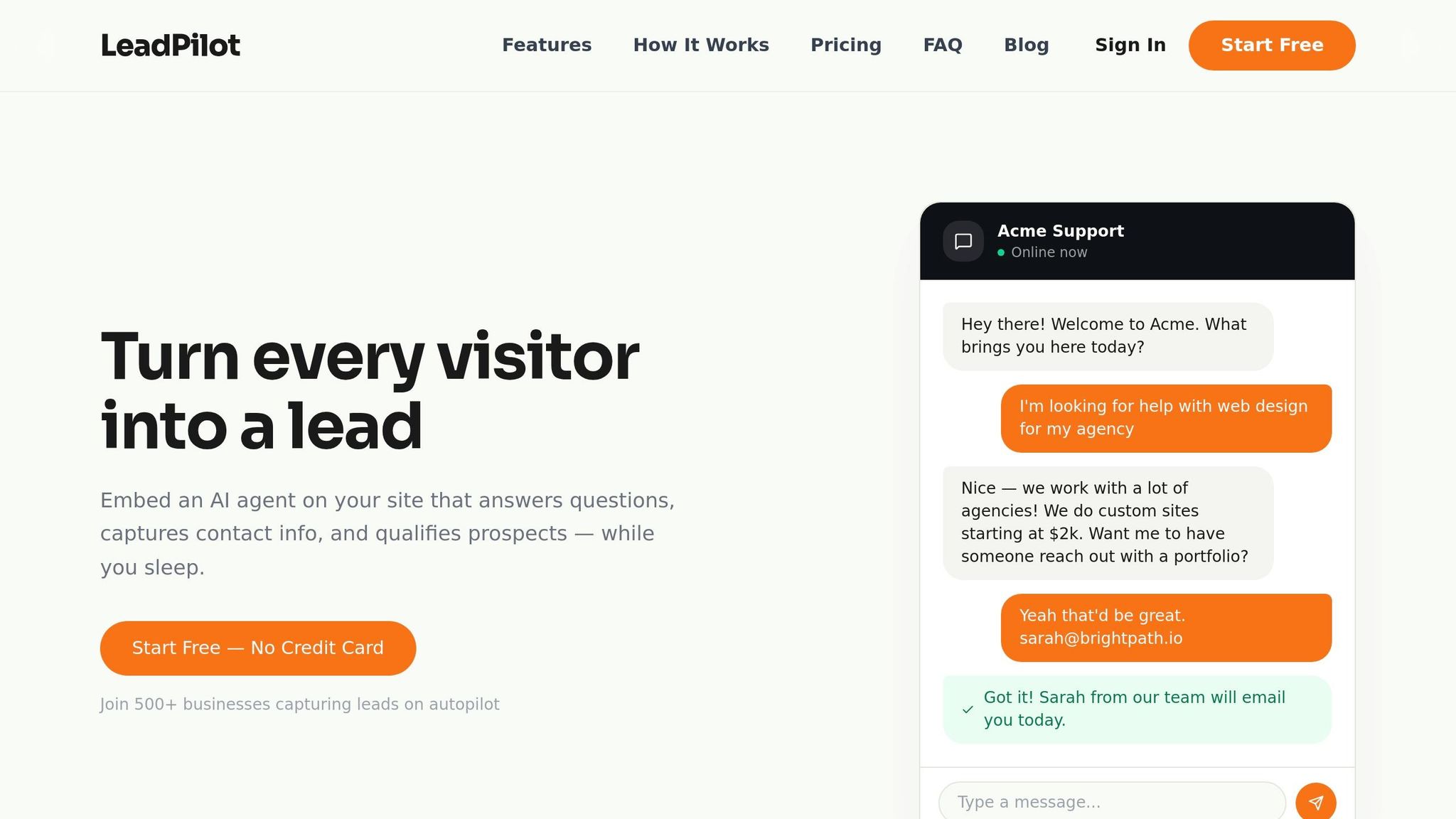
LeadPilot takes the hassle out of lead generation by using automation to handle interactions with your website visitors. With just a small code snippet added to your site, it activates an AI agent trained on your website’s content. As soon as someone visits your page, the AI engages them in a natural conversation - answering questions about your products or services and collecting contact details - all without requiring manual input.
The platform scans your entire site to understand your offerings, enabling it to respond intelligently to queries. For example, if a visitor asks about pricing, features, or availability, the AI provides instant, accurate answers directly based on your site’s information. LeadPilot’s dashboard showcases performance metrics like a 12.5% lead conversion rate, an average deal size of $8,450, and a 45-day sales cycle.
AI-Powered Website Conversations
The AI agent goes beyond simply collecting names and emails - it actively qualifies leads through conversation. If a visitor asks about specific integrations or requests an enterprise-level quote, the system identifies these as high-intent signals and adjusts the lead score accordingly. This conversational data helps your sales team prioritize leads, giving them a clear picture of buyer intent before making contact.
You can also tailor the AI agent’s tone and behavior to fit your brand. Whether you prefer a professional approach or a casual, friendly vibe, the AI adapts to reflect your business. Since it’s trained on your actual website content, its responses remain accurate and relevant. These smart interactions pave the way for real-time lead scoring and alerts, giving your sales team a head start.
Lead Scoring and Real-Time Alerts
LeadPilot tracks visitor behavior in real time, analyzing actions like spending over three minutes on your pricing page, scroll depth, and exit intent. Leads are then scored on a dynamic 0–100 scale, helping distinguish between prospects who are ready to buy and those who need further nurturing. This AI-driven scoring improves the number of sales-ready leads by 68% and allows teams to respond 9 times faster to high-intent prospects.
When a lead reaches your set scoring threshold, the system sends instant notifications via Slack or email. These alerts include detailed context, such as chat transcripts and page history, so your sales team can follow up with personalized messages. Following up within 24 hours has been shown to close deals 40% faster. By bridging the response gap, LeadPilot ensures you don’t lose qualified leads. Plus, it integrates seamlessly with Salesforce and HubSpot through Webhooks or Zapier, keeping your CRM updated.
Easy Setup and Customization
LeadPilot is designed to be simple and adaptable. Installing it is as easy as pasting a single line of code. Once it’s live, the platform automatically scans your site to train the AI agent - no complicated setup or technical knowledge required.
You can then customize the widget’s appearance, tweak the agent’s tone, and define lead qualification criteria. The Growth plan allows you to remove LeadPilot branding, while the Scale plan offers white-label options for agencies managing multiple clients. You’re also in control of where the widget appears, what questions trigger specific responses, and how actively the AI engages visitors. This flexibility ensures LeadPilot fits seamlessly into your business strategy.
LeadPilot Pricing and Plans
LeadPilot offers pricing based on conversation volume, giving businesses predictable costs as they scale their lead generation efforts. There are four plans available, tailored to fit various stages of growth - from trying out the platform to managing unlimited AI-driven conversations across multiple websites.
What Each Plan Includes
The Free plan is perfect for testing the platform. It includes 1 AI agent and allows up to 50 conversations per month. You’ll get basic lead capture features, a full website crawl for AI training, and access to core conversation tools - all without needing a credit card. This plan works well for solo entrepreneurs exploring LeadPilot’s capabilities.
At $49/month, the Starter plan increases the limit to 1,000 conversations per month and introduces lead scoring with email notifications. This option is ideal for small businesses that want consistent lead capture but don’t yet require multiple AI agents or advanced features.
The Growth plan, priced at $99/month, supports 3 AI agents and allows 5,000 conversations per month. It also includes lead qualification tools and removes LeadPilot branding, making it a popular choice for businesses looking to create a polished, professional experience while deploying AI across different pages or product categories.
For larger operations, the Scale plan is available at $199/month. This tier offers unlimited AI agents and conversations, white-label branding, and priority support. It’s designed for agencies managing multiple client sites or enterprises with significant traffic and lead generation needs.
How to Choose the Right Plan
To select the best plan, start by estimating your monthly website traffic and engagement rate. For instance, if you have 500 visitors per month with a 10% engagement rate, you’ll generate about 50 conversations - making the Free plan a good fit. However, businesses with 10,000 monthly visitors and similar engagement rates should consider the Starter or Growth plans to avoid hitting conversation limits.
Company size is another factor. Solo consultants may find the Free or Starter plans sufficient, while small teams (5–20 employees) often benefit from the Growth plan. Agencies or enterprises with high traffic or multiple sites should opt for the Scale plan to eliminate restrictions on AI agents and conversations.
Budget also plays a role, but it’s worth calculating the cost per conversation. For example, the Starter plan averages about $0.05 per conversation, while the Growth plan reduces that to approximately $0.02. If you’re nearing a plan’s conversation cap, upgrading is usually more cost-effective than incurring overage fees. Plus, with a 15-day cancellation policy, you can upgrade risk-free.
Setting Up LeadPilot for Your Business
Installing and Configuring the Widget
Getting started with LeadPilot is quick and straightforward. After signing up, you'll find a unique JavaScript snippet in your dashboard. Simply copy this code and paste it into your website's <head> tag. This placement ensures the script loads correctly and begins tracking visitor behavior right away. If you're using platforms like WordPress or Shopify, you can add the snippet through the theme's custom code section.
Once the installation is complete, LeadPilot immediately scans your site to train its AI using your existing content. From your dashboard, you can adjust the widget's design to match your branding. You can also set up notification preferences to receive alerts via SMS or email whenever high-value leads interact with your site.
The widget is designed to load asynchronously, so it won't slow down your website. To maintain optimal performance, ensure the script loads in under 150 milliseconds. You can also enable an onsite prompt to encourage visitors to start a conversation.
After setup, spend some time refining your settings to maximize the quality of your lead capture.
Improving Lead Quality and Scaling Up
Once the widget is live, the next step is to focus on improving lead quality to boost conversions. Start by defining your Ideal Customer Profile (ICP) with clear rules. For example: "IF company size > 500 AND title is VP, THEN Tier A". This allows LeadPilot's AI to score leads on a 0-100 scale, evaluating their full profile context. Setting a qualification threshold at 60/100 ensures you're only targeting high-fit leads.
When you're ready to scale, consider starting with a human-in-the-loop process. Initially, route about 20% of your traffic to the AI while having humans review the results to fine-tune the lead-scoring logic. As you gain confidence, you can expand AI coverage, assigning agents to specific pages or product categories. Depending on your plan, the Growth option supports 3 agents, while the Scale plan offers unlimited agents.
Use the dashboard to track which lead sources are most effective. For instance, if referrals convert at 95%, while social media lags at 62%, you'll know where to focus your marketing efforts. Experiment with different engagement triggers, like a popup appearing after 10 seconds versus at 50% scroll depth, to see what resonates best with your audience. Keep in mind that visitors are 40% more likely to engage with qualifying questions through a chat interface than through a traditional form. Leveraging conversational lead capture can significantly enhance your results.
"The point of automation isn't to replace strategy. It's to free up your team's time so they can focus on the work that actually requires a human brain." - Personizely
Finally, connect LeadPilot to your CRM to sync qualified leads automatically. This integration also allows you to set up reminders for timely follow-ups, ensuring no opportunity slips through the cracks.
LeadPilot Use Cases and Tips
Once your setup is ready to go, here’s how businesses are using LeadPilot to capture leads and drive conversions.
How Small Businesses Use LeadPilot
Small businesses often struggle with generating quality leads without the resources for a full sales team. That’s where LeadPilot steps in. The AI widget engages visitors in real time, answers their questions using your website content, and collects contact information - all without needing someone to monitor the site around the clock.
LeadPilot’s flexible plans make it easy for smaller teams to get started and scale up. The Free plan is great for testing the waters, while the Starter plan adds useful features like lead scoring and email notifications. For businesses ready to expand, the Growth plan allows you to deploy up to three AI agents across different pages or product lines. This is ideal for companies managing multiple services or entering new markets, as each agent can be customized for specific needs.
Now, let’s explore some practical tips to help you get even better results.
Tips for Increasing Conversions
- Test different opening lines: Experiment with how your AI agent starts conversations. For instance, compare a question like “Struggling to find qualified leads?” with a more benefit-driven line like “Discover how we help businesses capture more leads.” Even small tweaks in phrasing can lead to noticeable changes in engagement.
- Analyze your lead data weekly: Take time to review which pages are driving the best conversations and what questions visitors are asking. If you notice recurring inquiries about pricing or integrations, consider making that information easier to find on your site.
- Set up instant alerts for high-value leads: Configure email or SMS notifications for leads with a score above 80 out of 100. Responding quickly to these high-potential prospects can significantly boost your chances of closing the deal. Integrating LeadPilot with your CRM also ensures that qualified leads are automatically added to your sales pipeline.
- Experiment with chat triggers: Test when the chat widget appears - whether after 10 seconds or when a visitor scrolls halfway down the page. Visitors are often more likely to engage with a chat prompt than a traditional form, so finding the right timing can make a big difference.
"Automation isn't to replace strategy. It's to free up your team's time so they can focus on the work that actually requires a human brain." - Damian Biricevski, Personizely
Conclusion
Automated lead generation goes beyond just saving time - it reshapes how businesses attract and convert prospects. With AI managing repetitive tasks like engaging website visitors, qualifying leads, and sending instant alerts, your team can zero in on what truly matters: building connections and closing deals.
The stats back this up. Businesses using automated lead generation report an average ROI of 544% within three years. Plus, 77% of B2B marketers have seen higher conversion rates after adopting these tools. Even more compelling, automation can free up 30 to 50 hours per week - time that sales teams typically spend on manual prospecting. These figures highlight the game-changing strategies discussed throughout this guide.
LeadPilot makes adopting automation simple for businesses of any size. Whether you're starting with the Free plan or scaling to accommodate unlimited agents, the platform handles the heavy lifting. Its AI widget works 24/7, qualifying leads in under five minutes, so no opportunity is missed.
Getting started is quick and easy. Setup takes just minutes: add a single line of code to your site, customize your AI agent’s tone and greeting, and you're ready to capture leads around the clock. In fact, in 2023, Matthew Rasmussen, a blogger from New York, shared that 30% of his in-person visitors first interacted with the LeadPilot widget on his website.
FAQs
How do I know if my business is ready for automated lead generation?
If your business struggles with inconsistent prospecting, delayed follow-ups, or clunky manual workflows, it might be time to consider automated lead generation. Automation can help you respond to leads more quickly, scale your outreach efforts without losing that personal touch, and simplify your processes using AI-powered tools. The result? Improved efficiency, a higher volume of leads, and faster response times.
What should I track to prove automation is increasing qualified leads and revenue?
Tracking the right metrics is crucial to understanding the impact of your automation efforts. Pay attention to key indicators like the number of qualified leads produced, response times, and conversion rates. For instance, engaging with leads quickly - within five minutes - can dramatically increase the chances of qualification.
Additionally, keep an eye on improvements in lead quality and the revenue growth directly linked to your automated campaigns. By consistently monitoring these metrics over time, you'll gain a clear picture of whether your automation strategies are delivering more qualified leads and driving higher revenue.
How do I set lead-scoring rules that match my ideal customer profile?
To zero in on your ideal customer, start by outlining key criteria that align with your business goals. These typically fall into four main categories:
- Demographic: Age, gender, income level, job title, or any personal attributes relevant to your product or service.
- Firmographic: For B2B, this includes company size, industry, revenue, or geographic location.
- Behavioral: Actions like website visits, content downloads, email engagement, or product usage patterns.
- Intent Signals: Indicators of purchase intent, such as searches for specific keywords, product comparisons, or interactions with competitor brands.
Once you've identified these criteria, assign numerical values to reflect their importance. For example, a lead from your target industry might score higher than one from a less relevant sector. Automating this scoring process ensures it updates dynamically as new data streams in, keeping your system responsive to changes in customer behavior.
But it doesn’t stop there - regularly review and refine your scoring rules. As your business evolves, so will your ideal customer profile. Adjusting these criteria ensures you stay focused on high-value leads, improving sales efficiency and driving better results.